Webcam Light Mounts in 2026: Clip, Arm or Tripod?
Clip, desk arm or tripod? We compare webcam light mount styles by desk depth, monitor bezel and camera weight — plus four mounting picks worth buying in 2026.
Reader-supported: we may earn a commission from links on this page, at no extra cost to you. It never affects our picks. Learn more.
Lighting advice for video calls almost always stops at "buy a key light." The harder question is where the light physically goes. A 1.2kg panel on a thin monitor bezel, a 60cm-deep desk already holding a keyboard and two mugs, a webcam that needs to sit dead centre at eye level — these constraints decide your mount long before brightness does.
We compared the three dominant mounting styles — monitor clip, clamp-on arm or pole, and tripod — against manufacturer spec sheets, published load ratings, and patterns in verified owner feedback. Here's how to match one to your desk.
The three mount types, quickly
Monitor clips hang the light off the top of your display. Zero desk footprint, no cable routing drama, and the light is automatically pointed where your face is. The catch: load limits are low, modern thin-bezel monitors offer very little to grip, and a clip that sits on the bezel top often collides with the webcam you already parked there.
Clamp-on arms and poles grip the back or side edge of the desk. They lift weight entirely off the monitor, reach over or around the display, and let you put a light at 45 degrees off-axis — which is what actually makes footage look professional rather than flat. They need a desk edge of the right thickness and a bit of clearance behind.
Tripods sit on the desk surface. Cheapest, simplest, most portable, and completely monitor-agnostic. They also consume the one resource most desks don't have: depth. On anything under about 60cm deep, a tripod ends up either too close to your face or shoved so far to the side it stops lighting you.
Match the mount to your desk and your gear
Measure three things first
- Desk depth. Under 60cm, skip tripods for anything bigger than a palm-sized light; go clip or clamp. 70cm or more and a tripod becomes viable.
- Desk edge thickness and overhang. Clamp mounts typically quote a jaw range. Thick butcher-block tops, lipped IKEA desks and anything with a crossbar near the rear edge are the usual failure points. Check your desk's rear edge is flat and unobstructed for a few centimetres.
- Monitor bezel depth and panel weight tolerance. Clip mounts need a flat bezel top and a rear surface to brace against. Curved ultrawides, monitors with thick rear ventilation humps, and ultra-thin OLEDs are the ones owners most often report wobble with.
Then weigh the light
Small LED cubes and clip-on ring lights are fine on almost anything. Full key light panels are a different class — they need either a purpose-built clamp pole or a floor stand. Putting a heavy panel on a lightweight tripod with a small base is how lights end up face-down on keyboards. If a mount doesn't publish a load rating, treat that as a limit of roughly "phone-sized accessory only."
Comparison: which style fits you
| Monitor clip | Clamp arm / pole | Tripod | |
|---|---|---|---|
| Desk space used | None | Minimal (edge only) | Significant |
| Best desk depth | Any | Any | 70cm+ |
| Works with curved/thin-bezel monitors | Often poorly | Yes | Yes |
| Supports heavy key light panels | Rarely | Yes | Only with large base |
| Off-axis 45° lighting | No — frontal only | Yes | Yes |
| Height above eye level | Limited | Yes, easily | Limited |
| Portability | Good | Poor | Excellent |
| Setup difficulty | Lowest | Medium | Low |
| Typical weak point | Bezel grip, wobble | Needs clear desk edge | Tip-over, footprint |
Our mounting picks for 2026
Best overall: Elgato Multi Mount Core
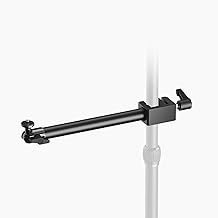 Best overall · Elgato Multi Mount Core — Check price on Amazon →
The Multi Mount Core is a steel pole with a desk clamp, and its real advantage is that it's a system rather than a product. Extension rods, flex arms, ball-joint adapters and phone/camera holders all thread onto the same pole, so a mount you buy for a key light today can carry a second light, a mic boom or a top-down camera later. Standard 1/4"-20 threading means third-party light heads bolt straight on.
It's the right answer if you expect your setup to evolve, or if you want the light at 45 degrees and above eye level — the single biggest visual upgrade over a frontal clip.
Best for larger rigs: Elgato Master Mount L
Same clamp philosophy, considerably more height. The L version's extended pole gets a key light well above the top of a large monitor, which matters on 32-inch and ultrawide displays where a short mount just lights the top of your head. Pair it with a heavier panel and it stays planted; pair it with a tiny cube and it's overkill.
Check your rear desk clearance before buying — tall clamp poles want a few centimetres behind the desk edge and a wall that isn't flush against it.
Best tripod: Manfrotto PIXI Mini Tripod
 Best tripod · Manfrotto PIXI Mini Tripod — Check price on Amazon →
Most mini tripods fail in the same way: the ball head creeps under load and the light slowly droops over a 40-minute call. The PIXI's push-button ball lock is notably more positive than the friction-only heads on cheap alternatives, and the legs fold into a grip for handheld use. It's small, so it suits compact LED panels and webcams rather than full key lights — but within that envelope it's the one that stays where you put it.
This is also the pick for anyone who works from different desks. Nothing clamps, nothing adjusts, you just set it down.
Budget arm pick: Neewer Overhead Desk Mount Stand with Clamp
 Budget arm pick · Neewer Overhead Desk Mount Stand with Clamp — Check price on Amazon →
If you want the geometry benefits of a clamp arm without the ecosystem price, Neewer's articulating desk stand delivers the fundamentals: a clamp base, a horizontal boom, and a 1/4" thread at the end. It swings a light over the monitor, off to one side, or straight overhead for desk-surface shots.
Owner feedback consistently flags the same trade-off — the joints need firm tightening and the arm sags with genuinely heavy loads. Keep it to lightweight-to-mid-weight lights and it does the job.
Best all-in-one: Lume Cube Edge 2.0 Desktop Light
 Best all-in-one · Lume Cube Edge 2.0 Desktop Light — Check price on Amazon →
Sometimes the cleanest fix is a light and clamp engineered together. The Edge 2.0's clamp is designed around monitor and laptop lids rather than adapted to them, so you skip the guesswork about bezel thickness entirely. It's a popular recommendation for webcam users for a reason: webcams have small sensors and need a lot of light, and a frontal clip light at face height solves that with one object and one cable.
The limitation is inherent to the format — a clip light sits where the monitor is, so you can't get it off-axis. For meetings and most streaming, that's an acceptable trade.
Practical setup notes
- Don't stack webcam and light on the same bezel. Owners repeatedly report that a monitor light bar plus a webcam on the same top edge is a fight. Put one on the monitor and the other on a clamp or tripod.
- Mind the cable. Clamp poles make cable routing tidy; tripods leave a USB-C lead crossing your desk. Velcro ties cost almost nothing.
- Height beats brightness. A moderate light slightly above eye level, angled down, beats a blinding one at eye level. Mounts that offer height adjustment pay off more than extra lumens.
- Check threading before you buy a light. 1/4"-20 is near-universal; cold-shoe-only accessories need an adapter.
FAQ
Will a monitor clip damage my display? A well-designed clip spreads load across the bezel and the rear housing and shouldn't mark a monitor. The risk is with heavy lights on thin OLED panels — those flex. If the light weighs more than a few hundred grams, use a clamp mount instead.
Can I mount a webcam and a light on the same arm? Yes, if the arm has two attachment points or you add a dual-mount bracket. Keep the webcam centred on your eyeline and push the light off to one side; stacking both in the same spot defeats the purpose.
What thread size do webcam lights use? Almost all use 1/4"-20, the standard tripod thread. That means tripods, clamp poles and boom arms are broadly interchangeable — confirm the specific product's spec sheet if it uses a proprietary clip.
Is a ring light still a good option in 2026? For straightforward video calls, yes — a ring light mounted around or beside the webcam gives even, forgiving light. For anything more cinematic, a single off-axis key light on a clamp arm looks better.
Do I need a mount at all if my light sits on the desk? Only if your desk is deep enough to place it well. On a shallow desk, a light sitting flat on the surface points up at your chin — unflattering and the reason clip and clamp mounts exist.
Our picks
Elgato Solid Arm, Holding Arm with Padded Clamp
Clamp-to-desk steel pole with a huge accessory ecosystem — the most upgradeable mount here.
Elgato Master Mount L
Tall 125cm clamp pole that gets a key light above eye level without eating desk space.
Manfrotto MTPIXIMII-B, PIXI Mini Tripod with Handgrip for Compact System Cameras, for DSLR, Mirrorless, Video, Made in Italy, Technopolymer and Aluminum, Black
Tiny, genuinely rigid ball-head tripod that holds small lights and webcams without creeping.
NEEWER 22" Magic Arm with Desk C Clamp, Overhead Camera Mount, UA057
Articulating boom arm with a desk clamp for overhead or over-monitor light placement on a budget.
LUME CUBE Edge 2.0 LED Desk Lamp | Dimmable Home Office Desk Light with USB Charging Port & Strong Swing Arm | Adjustable Color Temperature and Brightness | Circle Webcam Light - Black 2pk
Light and clamp designed together, so monitor fit and tilt are sorted out of the box.
Get the best tech deals in your inbox
Join the BytePlaza newsletter for hand-picked gadget deals and new buying guides. No spam, unsubscribe anytime.
Related reads
Monitor Arm vs Riser in 2026: Which Wins Small Desks?
Monitor arm vs riser in 2026: we compare clamp depth, VESA limits, cable routing and desk reclaim on small desks, with picks for arms and fixed risers.
Monitor Light Bars in 2026: 4 Picks That Fix Desk Glare
Monitor light bars beat desk lamps for glare-free desk lighting. We compared the BenQ ScreenBar Halo, Baseus i-Wok, Xiaomi and more for 2026.
USB-C Monitor Hub 2026: One Cable, Zero Desk Clutter
A 2026 guide to USB-C monitor hubs and stand-mounted docks: which monitors have real built-in hubs, what PD wattage you need, and 4 picks that cut cable clutter.