TKL Keyboards in 2026: 5 Picks That Earn Their Desk Space
Looking for the best tenkeyless keyboard in 2026? We compared five TKL mechanical boards on switches, hot-swap, wireless, and build quality.
Reader-supported: we may earn a commission from links on this page, at no extra cost to you. It never affects our picks. Learn more.
The tenkeyless layout has quietly become the default for people who care about keyboards. It keeps the F-row, the navigation cluster and — crucially — dedicated arrow keys, while dropping the number pad that most people touch maybe twice a week. The payoff is real: roughly 15–20% less desk width, your mouse hand closer to your body, and a shoulder position that doesn't slowly wreck your neck over a long workday.
But "TKL" only describes the layout. What separates a keyboard you tolerate from one you actually enjoy is switch feel, mounting style, wireless flexibility and whether you can change your mind later without buying a whole new board. BytePlaza compared current TKL models using manufacturer specifications, independent reviews and verified owner feedback to pick five that hold up in 2026.
How we evaluated TKL keyboards
We weighted four things:
- Switch quality and choice. Pre-lubed linears and tactiles are now standard on decent boards. Hall effect (magnetic) switches add adjustable actuation and rapid trigger, which matters for competitive gaming and almost nothing else.
- Hot-swap sockets. The single biggest longevity feature. If you can pull switches without soldering, a keyboard you find "too light" in month two becomes a keyboard you love in month three.
- Sound and build. Gasket mounting, foam layers and PBT keycaps do more for typing feel than RGB ever will. Aluminum cases are heavier, quieter and more expensive.
- Connectivity. Tri-mode (USB-C, 2.4GHz dongle, Bluetooth) is the practical standard. Bluetooth-only wireless is fine for writing, less fine for shooters.
We did not weight RGB brightness heavily, and we ignored marketing claims that couldn't be verified against specs or third-party testing.
The picks at a glance
| Keyboard | Best for | Switch type | Hot-swap | Wireless | Case |
|---|---|---|---|---|---|
| Keychron Q3 Max | All-round typing + light gaming | Mechanical (linear/tactile options) | Yes | Tri-mode (2.4GHz/BT/USB-C) | Aluminum |
| Razer Huntsman V3 Pro TKL | Competitive gaming | Analog optical, adjustable actuation | No | Wired | Aluminum top plate |
| Corsair K70 CORE TKL | Tight budgets | Pre-lubed linear mechanical | No | Wired | Plastic |
| Keychron V3 Max | Value hot-swap + wireless | Mechanical (linear/tactile options) | Yes | Tri-mode (2.4GHz/BT/USB-C) | Plastic |
| SteelSeries Apex Pro TKL Gen 3 | Tuning obsessives | Hall effect OmniPoint 3.0 | No | Wired/wireless variants | Aluminum top plate |
 Premium pick · SteelSeries Apex Pro TKL Gen 3 — Check price on Amazon →
 Best value hot-swap · Keychron V3 Max — Check price on Amazon →
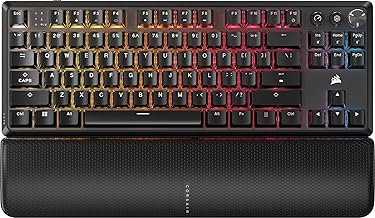 Best budget · Corsair K70 CORE TKL — Check price on Amazon →
 Best overall · Keychron Q3 Max QMK/VIA Wireless Mechanical Keyboard — Check price on Amazon →
Best overall: Keychron Q3 Max
The Keychron Q3 Max is the board we'd point most people toward, because it refuses to force a compromise. It's a CNC aluminum, gasket-mounted TKL with double-gasket construction and internal foam — the recipe that produces the deep, muted "thock" enthusiasts chase — but it also ships with QMK/VIA support and full tri-mode wireless, including a 2.4GHz dongle rather than Bluetooth alone.
That combination is rarer than it sounds. Plenty of custom-adjacent keyboards are wired-only; plenty of wireless boards are hollow plastic. The Q3 Max gives you hot-swap sockets (3-pin and 5-pin), pre-lubed switches from the factory, double-shot PBT keycaps and a screw-in stabilizer setup that reviewers consistently rate as well-tuned out of the box.
The trade-offs are honest ones. It is heavy — this is not a keyboard you toss in a backpack. QMK/VIA is enormously powerful but the web configurator has a learning curve if you've only ever used gaming software. And battery life drops sharply if you run RGB at full brightness over 2.4GHz, which is true of every wireless RGB board and worth planning around.
Buy it if: you want one keyboard for work and play, you care how it sounds, and you'd rather tweak switches than replace the whole thing.
Best for gaming: Razer Huntsman V3 Pro Tenkeyless
 Best for gaming · Razer Huntsman V3 Pro Tenkeyless — Check price on Amazon →
If your priority is input speed rather than typing feel, the Razer Huntsman V3 Pro Tenkeyless is the specialist. Its analog optical switches let you set actuation depth per key and enable rapid trigger, which resets the key the instant you start lifting instead of waiting for a fixed reset point. For counter-strafing in tactical shooters, that's a measurable advantage — and it's the reason this layout keeps showing up on esports desks.
You also get analog input, so movement keys can behave like an analog stick in games that support it. The board is wired only, which is a deliberate choice: no dongle latency, no battery anxiety.
Where it loses points against the Keychron is flexibility. There's no hot-swap, the switches are proprietary optical units, and Synapse software is heavier than most people want running in the background. If you type more than you frag, look elsewhere.
Best budget: Corsair K70 CORE TKL
The Corsair K70 CORE TKL is the answer to "I want something genuinely good but I'm not spending flagship money." It's the TKL version of a board multiple outlets have named their budget gaming pick, and the reason is that Corsair put the money where it shows: pre-lubed linear switches, sound-dampening foam layers inside the case, and a dedicated media roller that's more pleasant to use than any function-layer volume shortcut.
It's plastic, it's wired, and the switches are soldered — so treat it as a finished product rather than a platform. But the stock typing experience is well ahead of what budget boards offered even two years ago, and the TKL footprint means you're not paying for keys you don't use.
Buy it if: this is your first mechanical keyboard, or you need a solid second board for a work machine.
Best value hot-swap: Keychron V3 Max
The Keychron V3 Max is the Q3 Max with the aluminum removed. You keep the gasket mount, the hot-swap sockets, QMK/VIA, tri-mode wireless with a 2.4GHz dongle and the internal foam; you lose the CNC case, the weight and a chunk of the price.
Owner feedback is consistent on what that swap costs you: a slightly higher-pitched, less dense sound signature and a case that flexes more if you press on it. What it buys you is portability and a much lower barrier to entry for a customisable, wireless TKL. If you're new to hot-swap and not sure which switch you'll settle on, this is the smart place to start experimenting.
Premium pick: SteelSeries Apex Pro TKL Gen 3
The SteelSeries Apex Pro TKL Gen 3 is for people who want to tune everything. Its OmniPoint 3.0 Hall effect switches offer an unusually wide adjustable actuation range, rapid trigger, and dual-bind — one key doing two different things at two different depths. There's an OLED display on the board itself, an aluminum top plate, and a magnetic wrist rest in the box.
It's the most configurable keyboard here by a wide margin, and also the one most likely to have you fiddling in software instead of working. Like the Razer, the switches aren't swappable. Choose it if per-key actuation tuning genuinely appeals to you; skip it if you'd set it once and forget it.
Which one should you actually buy?
- Typing all day, gaming some evenings: Keychron Q3 Max.
- Ranked shooters are the whole point: Razer Huntsman V3 Pro TKL or Apex Pro TKL Gen 3.
- First mechanical board, sensible budget: Corsair K70 CORE TKL.
- Want hot-swap and wireless without the aluminum tax: Keychron V3 Max.
One last practical note: if you do occasional spreadsheet work, a separate Bluetooth numpad placed on your left side costs little and restores the only thing TKL takes away — while keeping your mouse where it belongs.
FAQ
Is a TKL keyboard better than a 75% or 65%? TKL keeps a full F-row and a proper navigation cluster with gaps between key groups, so nothing requires a function layer. A 75% squeezes the same keys tighter; a 65% drops the F-row entirely. TKL is the safest choice if you use F-keys, Home/End or Page Up/Down regularly.
Do I need hot-swap sockets? Not strictly, but they're the cheapest insurance against buyer's remorse. Switch feel is subjective and hard to judge before you've lived with a board. Hot-swap turns a wrong guess into a small fix rather than a new purchase.
Are Hall effect switches worth it for typing? Generally no. Their advantages — adjustable actuation, rapid trigger, analog input — are gaming features. For typing, a well-tuned mechanical board with good stabilizers and foam usually feels and sounds better.
Is 2.4GHz wireless fast enough for gaming? Yes. Modern 2.4GHz implementations run at high polling rates and are effectively indistinguishable from wired for the vast majority of players. Bluetooth is the connection to avoid for competitive play.
Will wireless hurt battery life if I run RGB? Significantly. Full-brightness RGB over 2.4GHz can cut runtime from weeks to days on most boards. Lowering brightness or using white-only lighting is the easiest fix.
Our picks
Keychron Q3 Max Wireless 2.4 GHz Bluetooth Custom Mechanical Keyboard
Gasket-mounted aluminum TKL with hot-swap sockets, QMK/VIA, and tri-mode 2.4GHz/Bluetooth wireless.
Razer Huntsman V3 TKL 8KHz Analog Optical Esports Gaming Keyboard, Black
Analog optical switches with adjustable actuation and rapid trigger for the fastest competitive input.
Corsair K70 CORE TKL Mechanical Gaming Keyboard, Black (Renewed)
Pre-lubed linear switches, sound dampening, and a volume wheel at a genuinely low price.
Keychron V3 Max TKL Wireless QMK Mechanical Keyboard, 2.4 GHz & Bluetooth
Plastic-bodied but gasket-mounted TKL with tri-mode wireless, QMK/VIA and hot-swap for far less money.
SteelSeries Apex Pro TKL Gen 3 Gaming Keyboard - OmniPoint 3.0 Analog Magnetic Switches, Quickset Auto-Presets (Rapid Trigger, Rapid Tap/SOCD, Protection Mode), OLED, RGB, PBT Keycaps, 2.4G+BT, Black
Hall effect OmniPoint 3.0 switches, per-key actuation tuning, and an aluminum top plate with OLED display.
Get the best tech deals in your inbox
Join the BytePlaza newsletter for hand-picked gadget deals and new buying guides. No spam, unsubscribe anytime.
Related reads
65% Keyboards in 2026: 5 Compact Picks That Earn Desk Space
Looking for the best 65% keyboard in 2026? We compare hot-swap compact boards, explain what you lose versus TKL, and rank five layouts worth the desk savings.
Hall Effect Keyboards in 2026: 5 Rapid-Trigger Picks
Magnetic Hall effect keyboards explained: what rapid trigger really does for gaming, plus 5 picks compared on actuation range, polling rate and software.
Best Mechanical Keyboards in 2026: Compared & Ranked
Our picks for the best mechanical keyboards in 2026, from gasket-mounted enthusiast boards to low-profile wireless models — tested for feel, sound and latency.