Split Ergonomic Keyboards in 2026: 5 Picks for Wrist Pain
The best split ergonomic keyboard for 2026, compared on tenting range, learning curve and wireless support — from beginner-friendly splits to full columnar boards.
Reader-supported: we may earn a commission from links on this page, at no extra cost to you. It never affects our picks. Learn more.
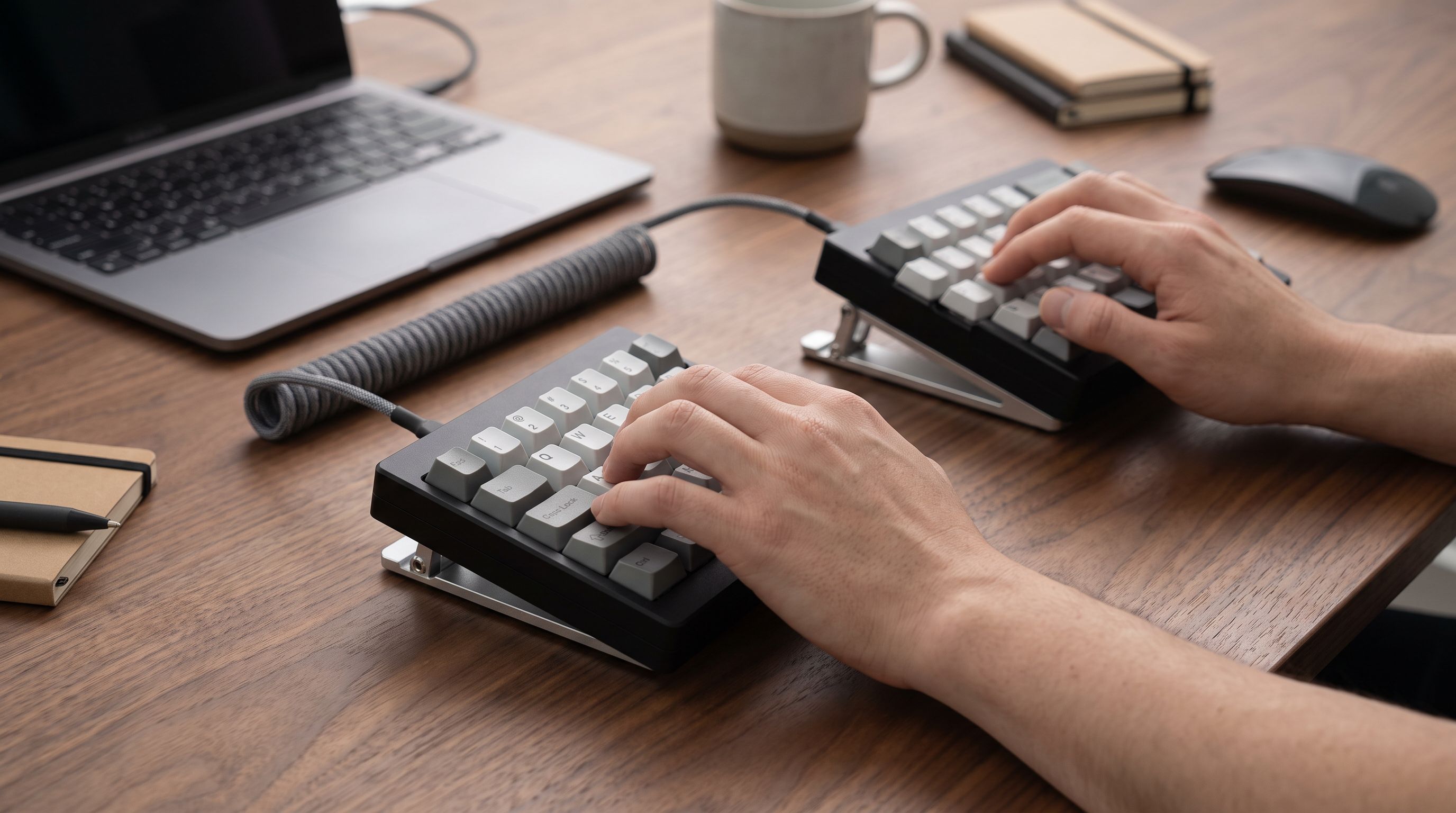
If your wrists ache by mid-afternoon, a split keyboard is one of the few desk upgrades with a clear mechanical rationale behind it. A conventional board forces three compromises at once: your wrists bend outward (ulnar deviation) to reach a narrow key block, your forearms rotate flat (pronation), and your shoulders roll forward. Splitting the halves fixes the first, tenting them fixes the second, and moving them shoulder-width apart helps the third.
We compared the leading split and tented keyboards available in 2026 using manufacturer specifications, independent review testing, and verified owner feedback, then ranked them by how much ergonomic benefit you get relative to how much typing ability you have to temporarily surrender.
The three decisions that actually matter
1. Row-stagger or columnar? Row-staggered splits (Kinesis Freestyle Edge RGB, Freestyle2) keep the familiar keycap layout you already touch-type on — you simply pull it apart. Columnar or "ortholinear" boards (ZSA Moonlander, Kinesis Advantage360) align keys in straight columns matched to finger length. Ergonomically that's better, but expect one to three weeks of reduced typing speed while your muscle memory rewires.
2. How much tenting do you need? Tenting raises the inner edges of each half so your palms angle toward each other. Even 10–15° meaningfully reduces forearm pronation for most people. Some boards tent natively via legs or feet; others need a separate tenting kit or a pair of camera tripods. Check this before you buy — it's the feature most commonly missing.
3. Wired or wireless? Wireless splits eliminate the bridge cable between halves and let you set them at any width, including on opposite sides of a keyboard tray or on chair armrests. The Kinesis Advantage360 Professional and boards like the Dygma Defy lead here. Wired splits are cheaper, never need charging, and have zero latency concerns.
 Premium pick · Kinesis Advantage360 Professional — Check price on Amazon →
 Budget pick · Kinesis Freestyle2 for PC — Check price on Amazon →
Comparison at a glance
| Keyboard | Layout | Tenting | Connection | Learning curve |
|---|---|---|---|---|
| Kinesis Freestyle Edge RGB | Row-staggered, standard | Via optional Lift Kit accessory | Wired, bridge cable | Very low |
| Kinesis Freestyle2 | Row-staggered, standard | Via optional accessory kit | Wired, fixed-length bridge | Very low |
| ZSA Moonlander Mark I | Columnar stagger + thumb cluster | Built-in adjustable legs | Wired between halves | High |
| Kinesis Advantage360 Pro | Concave key wells, columnar | Fixed contoured tenting | Wireless halves | High |
| Logitech Ergo K860 | One-piece split curve | Fixed curve + wrist rest | Wireless (Bluetooth/receiver) | Minimal |
 Best non-split alternative · Logitech Ergo K860 — Check price on Amazon →
 Best for full ergonomic commitment · ZSA Moonlander Mark I — Check price on Amazon →
Best overall: Kinesis Freestyle Edge RGB
The Freestyle Edge RGB remains the default recommendation for good reason: it gives you the single biggest ergonomic win — hand separation — without asking you to relearn anything. The layout is a standard TKL cut in half, so touch-typists are back at full speed within an hour. The bridge cable allows generous separation between the halves, enough to align each hand with its own shoulder.
It uses genuine Cherry MX mechanical switches and includes onboard programmability and macro support, so it doubles as a gaming board. The critical caveat: tenting requires the separately sold Lift Kit accessory, which adds fixed angle options. Budget for it. Flat splitting alone treats deviation but not pronation, and pronation is what most desk workers feel as forearm burn.
Budget pick: Kinesis Freestyle2
If you want to test whether splitting helps you before spending mechanical-keyboard money, the Freestyle2 is the sane experiment. It's a membrane board with low-force switches, a slim profile and the same fundamental idea. Reviewers consistently note it feels less premium than the Edge — the keys are mushier and there's no RGB or heavy programmability — but the postural benefit is identical. Note the bridge cable comes in fixed lengths depending on the version you buy, so check the separation you need before ordering.
For people whose pain comes primarily from wrist angle rather than key force, this is often all they ever needed.
Best for full ergonomic commitment: ZSA Moonlander Mark I
The Moonlander is where you go when you've decided to actually change how you type. Columnar stagger, a proper thumb cluster that moves work away from overtaxed pinkies, and legs that let you tent each half independently — including aggressively — make it the most adjustable mainstream option short of a custom build.
Its real advantage is ZSA's Oryx web configurator and its layer system. Instead of stretching for numbers and symbols, you build layers accessed by a thumb key, which shrinks total finger travel dramatically. Owner feedback is consistent on the trade-off: typing speed drops sharply for the first week or two, then recovers, and many people end up faster and more comfortable than before. If your job depends on immediate typing throughput this month, start with a Freestyle instead.
The Moonlander connects the halves with a cable and to the computer with a cable — this is not the pick if you want a wireless desk.
Premium pick: Kinesis Advantage360 Professional
The Advantage line is the reference point for contoured ergonomic keyboards, and the 360 Professional modernises it with two genuinely separate wireless halves. The concave key wells mean fingers move down into scooped bowls rather than out across a flat plane, and the thumb clusters take on modifiers, Enter and Backspace. Independent reviewers and long-term Advantage owners frequently describe it as the endpoint for serious RSI cases.
It's the most expensive route and the steepest adjustment — the key wells make hunting-and-pecking essentially impossible, so you have to touch-type. Kinesis positions the Advantage360 range around programmability via ZMK-based firmware on the Professional model, which is a plus if you like tinkering and a mild complication if you don't. If your wrist pain is medically significant and you type all day for a living, it's the one with the strongest track record.
Best non-split alternative: Logitech Ergo K860
Not everyone should buy a split. If you share a desk, hot-desk between offices, or simply don't want a learning curve, the Logitech Ergo K860 is the pragmatic middle ground. It's a single unit with a split-curve layout, a fixed negative-tilt option and an integrated cushioned wrist rest. Every finger stays where your muscle memory expects it.
You give up adjustability — you can't widen the halves or increase the tenting angle — but for mild discomfort rather than injury, the K860 addresses deviation and wrist extension well, connects wirelessly to multiple devices, and requires zero adaptation. Consider the MoErgo Glove80 at the opposite end of the spectrum if you want maximum adjustability with low-profile switches.
How to switch without making things worse
- Move gradually. Start with the halves only slightly apart, then widen over a week. Sudden extreme separation can strain shoulders.
- Get the height right first. A split keyboard on a too-high desk still causes problems. Elbows at roughly 90°, wrists straight and floating, not resting while typing.
- Add tenting second, not last. Once you're comfortable split, introduce 10–15° of tent and increase only if it feels better.
- Keep the old board for a week. Swapping back for deadlines reduces the temptation to abandon the switch entirely.
- A keyboard is not a treatment plan. Persistent numbness, tingling or night pain warrants a clinician, not a shopping cart.
FAQ
Does a split keyboard actually help RSI? It addresses specific mechanical causes — ulnar deviation and forearm pronation — that contribute to discomfort for many desk workers. It cannot fix pain caused by poor desk height, excessive mouse use or overall workload. Treat it as one part of a setup change.
How long until I'm back to full typing speed? On a row-staggered split like the Freestyle Edge, usually within a day. On a columnar board like the Moonlander or Advantage360, most owners report roughly one to three weeks to return to their previous speed.
Do I need tenting or is splitting enough? Splitting alone fixes wrist angle. Tenting fixes forearm rotation. If your discomfort is in the outer forearms or you notice tension in the top of your wrists, tenting is likely the piece you're missing.
Are wireless split keyboards worth the extra cost? Only if cable-free positioning genuinely matters to you — armrest mounting, tray setups, or a minimalist desk. Wired splits are otherwise equivalent ergonomically and cheaper.
Can I use a split keyboard for gaming? Yes. The Freestyle Edge RGB was designed with gaming in mind and includes macro keys and onboard profiles. Columnar boards work fine too but may require remapping for games that assume standard WASD geometry.
Our picks

KINESIS Freestyle Edge RGB Plus Split Mechanical Keyboard | Hotswap Linear Switches | RGB | Ergonomic | Detachable Palm Support | Fully Programmable | Mac Keycaps Included | Lift Kit Included
Standard layout, real mechanical switches and up to 20 inches of separation — the easiest split to adopt.
KINESIS Freestyle2 USB-A Ergonomic Keyboard w/ VIP3 Lifters for PC (9" Separation) (KB820PB-US)
A membrane split that costs a fraction of mechanical rivals and needs almost no relearning.
YIVU Borne 4x6 Split Mechanical Keyboard, Extended Corne Layout Ergonomic Keyboard, QMK/Vial Programmable, Hot Swappable RGB with Dual Rotary Encoders, Ready-to-Use Custom Keyboard for Coding
Columnar-stagger, thumb clusters and built-in tenting legs with excellent Oryx remapping software.
KINESIS Freestyle2 USB-A Ergonomic Keyboard w/ VIP3 Lifters for PC (9" Separation) (KB820PB-US)
Concave key wells plus wireless halves — the most aggressive posture correction you can buy assembled.
Logitech Ergo K860 Wireless Ergonomic Split Keyboard with Wrist Rest | Curved split keyframe, pillowed wrist rest, Bluetooth, USB connectivity with included USB Receiver, Windows Mac compatible
A one-piece split-curve board with a built-in wrist rest for anyone not ready for two halves.
Get the best tech deals in your inbox
Join the BytePlaza newsletter for hand-picked gadget deals and new buying guides. No spam, unsubscribe anytime.
Related reads
Trackball Mice in 2026: 5 Picks That Save Desk Space
Thumb vs finger trackballs compared for 2026: ball size, sensors, tilt, and owner-reported longevity, plus which model suits small desks and sore wrists.
Best Ergonomic Mouse 2026: Vertical & Trackball Picks
The best ergonomic mouse for wrist pain in 2026, ranked by hand size, grip style and wireless performance — vertical, trackball and sculpted picks compared.
USB-C Cable Tester Picks for 2026: Find the Fakes Fast
Which usb-c cable tester actually reveals 240W EPR support, e-marker data and real data speeds? We compared four worth owning in 2026, from $15 meters to lab tools.