USB-C Cable Tester Picks for 2026: Find the Fakes Fast
Which usb-c cable tester actually reveals 240W EPR support, e-marker data and real data speeds? We compared four worth owning in 2026, from $15 meters to lab tools.
Reader-supported: we may earn a commission from links on this page, at no extra cost to you. It never affects our picks. Learn more.
If you own a 240W EPR charger, a Thunderbolt dock and a drawer full of identical black cables, you already have a problem: USB-C hides everything important inside the connector. Two cables that look identical can differ by 140W of power delivery and 39Gbps of bandwidth. A usb-c cable tester is the cheapest way to stop guessing.
We compared the most-recommended inline meters and cable testers available in 2026 — drawing on manufacturer specs, independent reviews and owner feedback from communities like r/UsbCHardware — and narrowed it to four tools that answer different questions. Here's how to pick the right one.
What a USB-C tester can (and can't) tell you
This is where most buying guides overpromise. Be clear about the three categories:
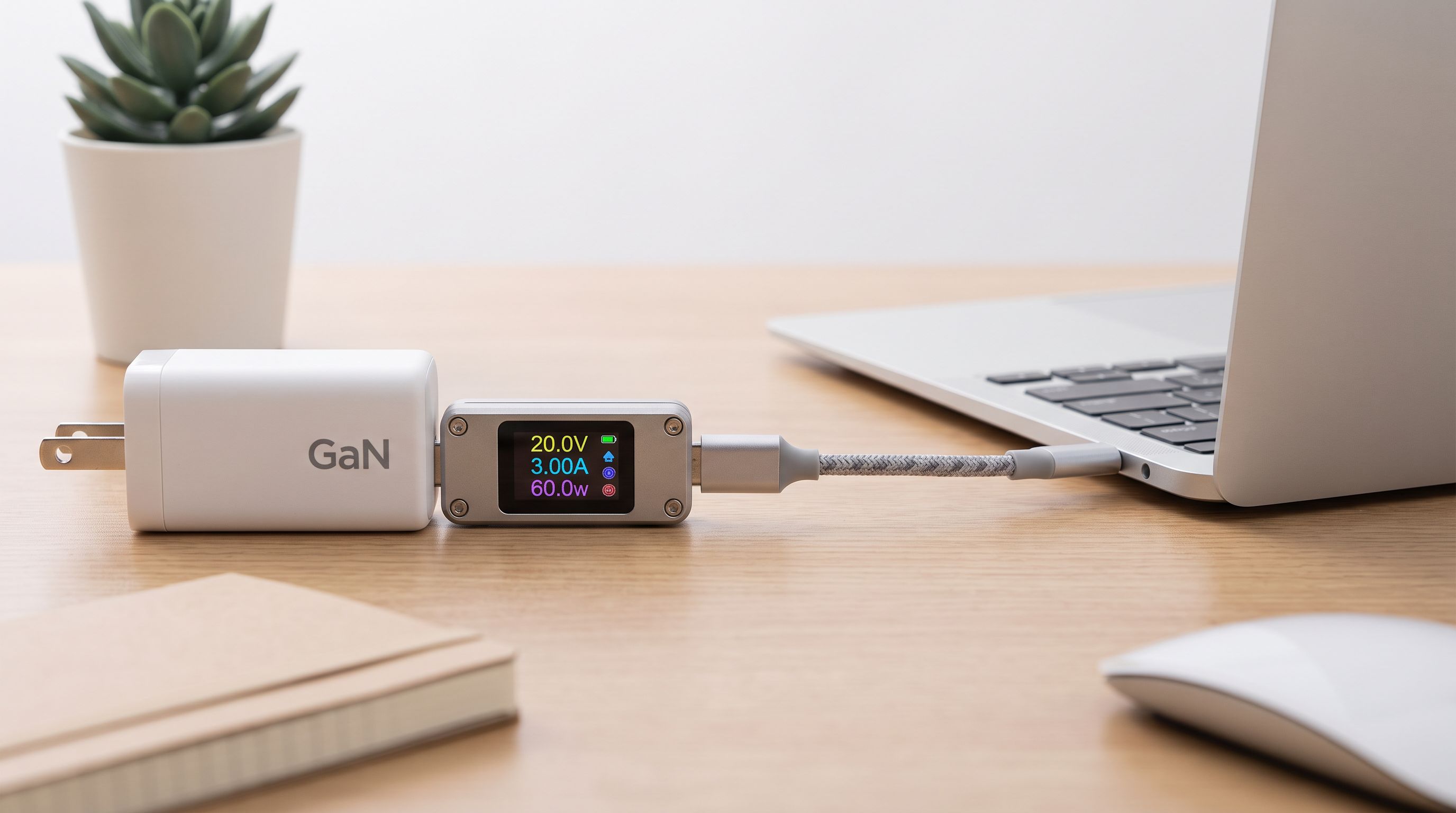
1. Inline power meters. A passthrough dongle that sits between charger and device. It shows volts, amps and watts in real time, and better models decode the USB Power Delivery handshake so you can see every PDO (power data object) a charger advertises — including the 28V/36V/48V EPR rails that enable 240W. These answer: is my charger actually delivering what it claims, and is this cable letting it?
2. Cable testers with e-marker decoding. Every USB-C cable rated above 3A (and every full-featured one) contains an e-marker chip that declares its current rating, speed and vendor ID. A tester that reads this chip tells you a cable's claimed capability instantly. Pair that with pin-by-pin continuity mapping and you learn whether a cable has the SuperSpeed pairs at all, or is charge-only.
3. Protocol analyzers. Enthusiast gear that captures the actual PD message traffic on CC lines, logs to a PC, and helps you debug why a dock renegotiates every five minutes.
What none of them do reliably: certify real data throughput. An e-marker is a claim, not a measurement. A cable can declare USB4 40Gbps and still be badly built. For true speed validation you still need to move files over a fast NVMe enclosure and watch sustained transfer rates — or spend on certification-grade equipment that costs more than your laptop. Treat the tester as a filter that catches obvious liars, not a certification lab.
How we chose
We prioritised four things: EPR awareness (does it read and display 28V/36V/48V PDOs up to 240W), e-marker decoding, display legibility, and whether the tool logs data or just flashes numbers. Price-to-usefulness mattered too — a $15 meter that catches a dangerous charger is better value than a $200 analyzer gathering dust.
The four picks
AVHzY CT-3 — best overall
 Best overall · AVHzY CT-3 — Check price on Amazon →
The AVHzY line has been the community default for years, and the CT-3 is the natural upgrade for anyone still on a CT-2. You get a colour display, PD/PPS/QC protocol triggering (so you can force a charger onto a specific rail and see if it holds), e-marker reading, and data logging. The trigger function is the headline feature: instead of passively watching, you ask the charger for 20V/5A and watch what actually happens. For anyone running EPR laptops or testing GaN bricks, that's the difference between a toy and a tool.
Owner feedback consistently praises the build and firmware updates; the common complaint is a learning curve on the menu system. Budget an evening with the manual.
Treedix USB Cable Tester with 2.4-inch Display — best for sorting a cable drawer
This one solves a specific, very satisfying problem: you have 30 cables and no idea which is which. The Treedix tester with the 2.4-inch display reads e-marker chips and shows pin-level connectivity, so within a few seconds per cable you know whether it's a 60W charge-only USB 2.0 cable or a 5A, high-speed one. Reviewers who ran their whole collection through it routinely report that a large share of cables turn out to be worse than expected — one widely-shared write-up concluded roughly half weren't worth keeping.
It's not a power meter in the live-monitoring sense, so it complements rather than replaces an inline unit. But as a one-evening audit tool followed by a label maker, it's the most immediately rewarding purchase here.
FNIRSI FNB58 USB Tester — best value
 Best value · FNIRSI FNB58 USB Tester — Check price on Amazon →
The FNB58 is the one to buy if you want 80% of the capability for a fraction of the fuss. Big colour LCD, USB-A and USB-C ports, PD decoding, fast-charge protocol detection, cable resistance measurement and ripple display. It's the model most commonly recommended when someone asks for "a good tester without going deep."
Its real advantage is price-driven: cheap enough that many people own two — one permanently inline at the desk, one in the travel bag for checking hotel and airport chargers.
Power-Z KM003C — premium pick
When you need to know why something fails rather than that it failed, the KM003C is the answer. It pairs with PC software for PD message capture, offers high-accuracy measurement and detailed logging, and handles EPR negotiation inspection. If you're troubleshooting a Thunderbolt dock that drops power, validating a product you're shipping, or writing reviews, this is the tier that gives you evidence instead of impressions. Overkill for a household — essential for a workbench.
Comparison table
| Model | Best for | E-marker decode | PD trigger / protocol tools | PC logging | Form factor |
|---|---|---|---|---|---|
| AVHzY CT-3 | All-round enthusiast use | Yes | Yes (PD/PPS/QC triggering) | Yes | Inline meter, colour screen |
| Treedix USB Cable Tester (2.4") | Auditing a cable collection | Yes, with pin mapping | No | No | Dedicated cable test fixture |
| FNIRSI FNB58 | Everyday checks on a budget | Yes | Yes (protocol detection/trigger) | Limited | Inline meter, large LCD |
| Power-Z KM003C | Debugging EPR/Thunderbolt faults | Yes | Yes, with PD message capture | Yes, full software suite | Inline meter + PC tool |
 Premium pick · Power-Z KM003C USB-C Tester — Check price on Amazon →
Buying advice by scenario
You just want to know if a charger is lying. A cheap inline meter is enough. The FNIRSI FNB58 covers it with room to grow.
You bought a 240W EPR charger and a 240W laptop and it's charging slowly. Nine times out of ten the cable is the bottleneck — 240W requires a 5A e-marked cable. The Treedix tester tells you in seconds which cables qualify; the AVHzY CT-3 confirms the charger is actually offering the 48V PDO.
You're deep in docks, hubs and Thunderbolt. Get the Power-Z KM003C and a cheap meter for quick checks. Analyzing CC-line negotiation is the only way to diagnose intermittent dock dropouts.
You think you don't need one. Fair — a sceptical view doing the rounds in 2026 argues most people's three questions ("does it charge fast, does it carry data, is it safe") can be answered by observation alone. That's true if you own three cables. It stops being true the moment you own fifteen and one of them is quietly capping your laptop at 15W.
Safety notes worth taking seriously
- Non-compliant cables and no-name chargers are the realistic fire/damage risk, not branded gear. A tester that flags a charger holding 20V on an unconnected port is worth its cost once.
- Beware cheap "240W" cables with no e-marker data or a mismatched vendor ID — that's a strong signal the rating is marketing, not engineering.
- Resistance matters. A cable with high resistance will sag under load; most of these meters show voltage drop, which is a practical proxy for cable quality.
FAQ
Can a USB-C tester measure actual data transfer speed? Not directly. It reads what the cable's e-marker chip claims and can show whether the high-speed pins are wired. For real throughput, test with a fast NVMe enclosure and watch sustained transfer rates.
Do I need a tester that supports 240W EPR? If you own EPR gear, yes — older meters may not display or correctly decode 28V/36V/48V PDOs. All four picks here handle modern PD 3.1 negotiation.
Will a tester damage my devices? Reputable inline meters are passthrough devices and are safe in normal use. The exception is aggressive trigger modes, which force specific voltages — don't use those with a device attached unless you know what you're doing.
Can these test Thunderbolt cables specifically? They can read the e-marker and confirm power and pin wiring, which catches most mislabelled cables. Verifying full 40Gbps Thunderbolt certification needs host-side tools and a real transfer test.
One tester or two? Two is a surprisingly common setup: a cheap meter that lives inline at your desk permanently, plus a dedicated cable tester for audits. The combination costs less than one premium analyzer.
Our picks
UCTRONICS Electronic USB Load Tester, Adjustable Discharge Resistor Module 35W, Test and Trigger QC2.0 QC3.0 AFC 9V FCP, Intelligent Temperature Control with Cooling Fan
Color screen, PD/PPS/QC trigger, e-marker decoding and logging — the enthusiast standard for a reason.

Carrying Case for Treedix USB Cable Tester with 2 Soft Screen Protectors
Reads e-marker chips and maps pin continuity, so you can label cables instead of guessing.
UYRUREL Screen Protector for FNIRSI FNB58 Tester,High-definition Scratch Resistant Nanofilm Film,HD Clear,Bubble Free with Easy Installation Kit,2 Pack
Big color LCD, PD decoding and fast-charge protocol triggers at a price that makes it easy to own two.
ChargerLAB Power-Z KM003C Portable USB-C Fast Charging Tester PD3.2 QC5.0 Digital Voltmeter & Ammeter Power Bank Tester
PC software, PD message capture and high-accuracy logging for anyone debugging EPR or Thunderbolt gear.
Get the best tech deals in your inbox
Join the BytePlaza newsletter for hand-picked gadget deals and new buying guides. No spam, unsubscribe anytime.
Related reads
Bedside Charging Stations in 2026: 5 Picks That Kill Cable Clutter
The best bedside charging station for 2026: Qi2 magnetic docks, alarm-clock combos and USB-C hubs compared for speed, dimmable displays and nightstand footprint.

240W USB-C Cables in 2026: Which EPR Cables Actually Hold Up
Looking for the best 240W USB-C cable? We compare EPR-rated, e-marked cables for 140W laptop charging — what the specs mean and which ones are worth buying in 2026.
Which KVM Switch Should You Buy in 2026? Laptop + Desktop
The best KVM switch picks for 2026, from USB-C docking KVMs to 4K 144Hz DisplayPort models — how to run a work laptop and a personal desktop on one desk.