LPCAMM2 Laptop Memory in 2026: Upgrade or Stay Soldered?
LPCAMM2 laptop memory is finally shipping in real notebooks. Here's how it compares to soldered LPDDR5X and SODIMM DDR5 — and which modules and laptops to buy in 2026.
Reader-supported: we may earn a commission from links on this page, at no extra cost to you. It never affects our picks. Learn more.
For the better part of a decade, buying a thin laptop meant one irreversible decision: how much RAM you ordered at checkout. Soldered LPDDR memory delivered the speed and power efficiency that fanless and thin-and-light designs needed, and in exchange you gave up any chance of upgrading later.
That trade-off is finally breaking down. LPCAMM2 — the compression-attached memory module standard — puts low-power LPDDR5X on a removable, screw-down module instead of soldering it to the mainboard. In 2026 it's no longer a spec-sheet curiosity: Lenovo's ThinkBook 14+ and 16+ with Intel Core Ultra Series 3 ship with upgradeable LPDDR5X-8533, Framework uses LPCAMM2 in the Laptop 13 Pro, and Crucial sells modules at retail in 32GB and 64GB capacities.
So what should you actually buy? Here's how the three options really compare.
The three kinds of laptop RAM in 2026
Soldered LPDDR5X
Still the default in most ultraportables, MacBooks, and anything under about 1.3kg. The memory chips sit directly on the mainboard, millimetres from the SoC. That short, tightly controlled trace length is why soldered memory hits the highest clocks and the lowest idle power — and why it will not go away.
The downside is permanent. If you buy 16GB, you own 16GB for the life of the machine. In an era where a local LLM, a browser with 40 tabs, and a Teams call can comfortably eat 20GB, that's a real risk to the laptop's useful lifespan.
DDR5 SODIMM
The classic upgradeable slot, still common in gaming laptops, mobile workstations, and 15–16" business machines. DDR5 SODIMMs are cheap, universally available, and come in capacities up to 64GB per kit without drama. A Crucial 32GB DDR5-5600 SODIMM Kit (2x16GB) is the single most cost-effective RAM upgrade available to most laptop owners.
What SODIMM gives up is power and density per millimetre. Standard DDR5 draws noticeably more idle power than LPDDR5X, and two stacked slots are far too tall for a 15mm chassis. That's why you almost never see SODIMMs in a premium ultrabook.
LPCAMM2
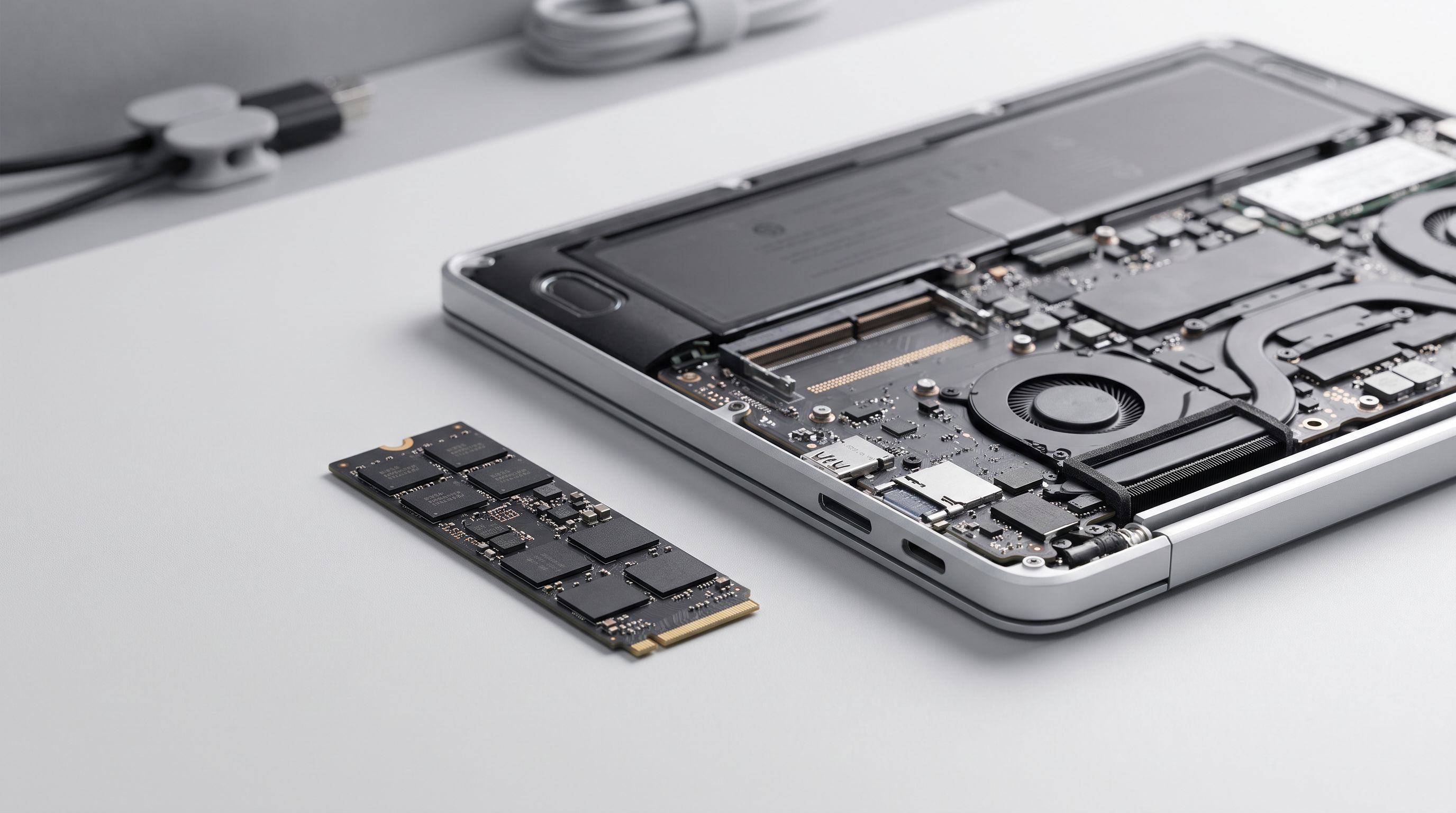
LPCAMM2 is the compromise that actually works. It's a flat module that bolts down against spring contacts rather than plugging into an edge connector, so it's thinner than a single SODIMM while carrying LPDDR5X silicon. One module provides a full 128-bit bus — no dual-channel pairing required — and it's user-replaceable with a screwdriver.
Crucial's retail lineup covers the mainstream: the Crucial 32GB LPCAMM2 LPDDR5X-7500 and the Crucial 64GB LPCAMM2 LPDDR5X-7500 are the modules most buyers will encounter, with OEM configurations reaching LPDDR5X-8533 in the newest ThinkBooks.
 Best overall LPCAMM2 module · Crucial 64GB LPCAMM2 LPDDR5X-7500 — Check price on Amazon →
Comparison at a glance
| Soldered LPDDR5X | LPCAMM2 | DDR5 SODIMM | |
|---|---|---|---|
| Upgradeable | No | Yes (single module swap) | Yes (one or two slots) |
| Typical speeds | Highest available | Up to 8,533 MT/s on current platforms | Commonly 5,600 MT/s class |
| Idle power | Lowest | Near-soldered (LPDDR5X silicon) | Highest of the three |
| Z-height | Minimal | Thinner than a SODIMM slot | Tallest |
| Channel config | Fixed by OEM | Full bus from one module | Needs a matched pair for dual-channel |
| Retail availability | N/A | Limited — mostly Crucial, few capacities | Excellent, every brand |
| Price per GB | Baked into laptop price | Highest | Lowest |
| Found in | Most ultrabooks, MacBooks | ThinkBook 14+/16+ (Core Ultra 3), Framework Laptop 13 Pro, some ThinkPads | Gaming laptops, workstations, 15–16" business laptops |
The catch nobody mentions in the launch videos
LPCAMM2 is genuinely a better standard. It is not yet a better market.
Availability is thin. Crucial is effectively the only broad retail supplier, and stock varies sharply by region — Framework has publicly had to downgrade pre-order configurations from 64GB to 32GB because modules weren't available in Europe. If your upgrade plan depends on buying a 64GB module 18 months from now, treat that as a risk, not a certainty.
Price per gigabyte is high. You're paying for LPDDR5X packaging plus a connector plus low volume. A 64GB LPCAMM2 module costs multiples of a 64GB DDR5 SODIMM kit. That gap should narrow as volume grows, but in 2026 it's real.
Compatibility isn't universal. LPCAMM2 modules are rated at a speed, and the host platform determines what it will run. A module rated for 7,500 MT/s dropped into a laptop that ships 8,533 MT/s memory will run at the lower speed. Validate against the laptop maker's supported-module list before you buy — this is not a DDR5 world where almost anything boots at some JEDEC fallback.
Don't confuse LPCAMM2 with CAMM2. CAMM2 is the standard DDR5 variant of the same physical idea, aimed mostly at desktops and some workstations. LPCAMM2 is the low-power LPDDR5X version used in laptops. They are not interchangeable.
What to buy in 2026
If you're buying a new thin-and-light and want it to last five years: prioritise a laptop with LPCAMM2. The 2026 ThinkBook 14+ and 16+ with Core Ultra Series 3 are the most mainstream options, and the Framework Laptop 13 Pro is the choice if repairability is the whole point. Order a sensible capacity now — 32GB is the realistic floor for an AI-era machine — and keep the upgrade path as insurance rather than a plan.
If you already own an LPCAMM2 laptop and need more memory: the Crucial 32GB LPCAMM2 LPDDR5X-7500 is the value pick; go to the Crucial 64GB LPCAMM2 LPDDR5X-7500 only if you run VMs, large datasets, or local models. Check your OEM's compatibility list first, and note that one module replaces everything — there's no "add a stick" here.
If your laptop has DDR5 SODIMM slots: honestly, you're in the best position of anyone. The Crucial 32GB DDR5-5600 SODIMM Kit (2x16GB) is the cheapest meaningful upgrade in laptop computing, and the Kingston FURY Impact 64GB DDR5-5600 SODIMM Kit (2x32GB) takes a workstation or gaming laptop to 64GB for far less than LPCAMM2 money. Match both slots for dual-channel bandwidth; a single stick can cost you serious iGPU performance.
If you're buying a soldered-RAM laptop anyway: fine — just buy the configuration you'll need in year four, not year one. Stepping up a RAM tier at purchase is almost always cheaper than replacing the whole machine early.
Whichever route you take, do the job properly: LPCAMM2 modules fasten with small captive screws that need even, correct torque against the compression contacts, and bottom covers are full of short, soft screws. An iFixit Pro Tech Toolkit is the sane way to avoid turning a ten-minute upgrade into a stripped-screw afternoon.
 Best companion toolkit · iFixit Pro Tech Toolkit — Check price on Amazon →
The honest verdict
LPCAMM2 is the right direction for laptop memory. It delivers close to soldered performance and efficiency while restoring something buyers lost years ago: the ability to fix a bad purchasing decision later. If you're choosing between two otherwise equal 2026 laptops and one has LPCAMM2, take it.
But don't pay a large premium purely for the upgrade path today. Module supply is narrow, pricing is high, and compatibility lists are restrictive. The pragmatic 2026 strategy is simple — buy enough RAM up front, prefer LPCAMM2 when it's available at a fair price, and if your machine still has SODIMM slots, enjoy the cheapest upgrade in the business while it lasts.
FAQ
Can I install LPCAMM2 in a laptop that has DDR5 SODIMM slots? No. They're physically and electrically different. LPCAMM2 requires a mainboard designed with the compression connector and mounting points.
Is LPCAMM2 slower than soldered memory? Slightly, in theory — longer electrical paths than chips soldered next to the SoC. In practice current LPCAMM2 platforms run LPDDR5X up to 8,533 MT/s, which is competitive with soldered memory in the same generation.
Can I use two LPCAMM2 modules for dual channel? You don't need to. A single LPCAMM2 module provides the full 128-bit bus. Some larger chassis support two modules for additional capacity, but one module is already full-width.
Does LPCAMM2 hurt battery life compared to soldered RAM? Barely. It uses the same LPDDR5X silicon, so idle power is far closer to soldered memory than to a DDR5 SODIMM.
How do I know which LPCAMM2 module my laptop accepts? Check the manufacturer's supported-memory documentation for your exact model. Speed rating and capacity support are platform-dependent, and a faster module will simply run at the host's supported speed.
Our picks
Crucial Pro 64GB DDR5 RAM Kit (2x32GB), 5600MHz (or 5200MHz or 4800MHz) Desktop Memory UDIMM 288-pin, Compatible with 13th Gen Intel Core and AMD Ryzen 7000 - CP2K32G56C46U5
The highest-capacity mainstream LPCAMM2 module, ideal for local AI work and heavy multitasking.
Crucial Pro 32GB DDR5 RAM Kit (2x16GB), 6000MHz (or 5600MHz or 5200MHz or 4800MHz) Desktop Memory UDIMM 288-pin, Compatible with 13th Gen Intel Core and AMD Ryzen 7000 - CP2K16G60C48U5
The sweet-spot capacity for most LPCAMM2 laptops without paying the 64GB premium.

Crucial 32GB DDR5 RAM Kit (2x16GB), 5600MHz (or 5200MHz or 4800MHz) Laptop Memory 262-Pin SODIMM, Compatible with Intel Core and AMD Ryzen 7000, Black - CT2K16G56C46S5
Cheap, everywhere, and still the right answer if your laptop has two DDR5 SODIMM slots.

Kingston FURY Impact 64GB (2x32GB) 5600MT/s DDR5 CL40 Laptop Memory Kit of 2 | Lower Power Comsumption | Intel XMP 3.0 | Plug N Play | KF556S40IBK2-64
64GB of DDR5 for workstation-class laptops at a fraction of LPCAMM2 pricing.
iFixit Pro Tech Toolkit - Electronics, Smartphone, Computer & Tablet Repair Kit
LPCAMM2 modules install with tiny torque-sensitive screws — a proper driver set matters.
Get the best tech deals in your inbox
Join the BytePlaza newsletter for hand-picked gadget deals and new buying guides. No spam, unsubscribe anytime.
Related reads
eGPU Dock 2026: Does Thunderbolt 5 or OCuLink Win?
Thunderbolt 5 vs OCuLink eGPU docks in 2026: real bandwidth limits, documented performance loss, and which cheap enclosure actually helps a thin-and-light laptop.
Video Editing Laptops Under $1,500 in 2026: 4 Real Picks
The best laptop for video editing 2026 under $1,500: we compared GPU power, RAM headroom, colour-accurate displays and 4K export performance across Windows and Mac.
Mini PC vs Laptop Dock in 2026: Which Wins Your Desk?
Mini PC vs laptop dock in 2026: we compare price, performance, upgrade paths and desk clutter to help you pick the right work-from-home setup.