eGPU Dock 2026: Does Thunderbolt 5 or OCuLink Win?
Thunderbolt 5 vs OCuLink eGPU docks in 2026: real bandwidth limits, documented performance loss, and which cheap enclosure actually helps a thin-and-light laptop.
Reader-supported: we may earn a commission from links on this page, at no extra cost to you. It never affects our picks. Learn more.
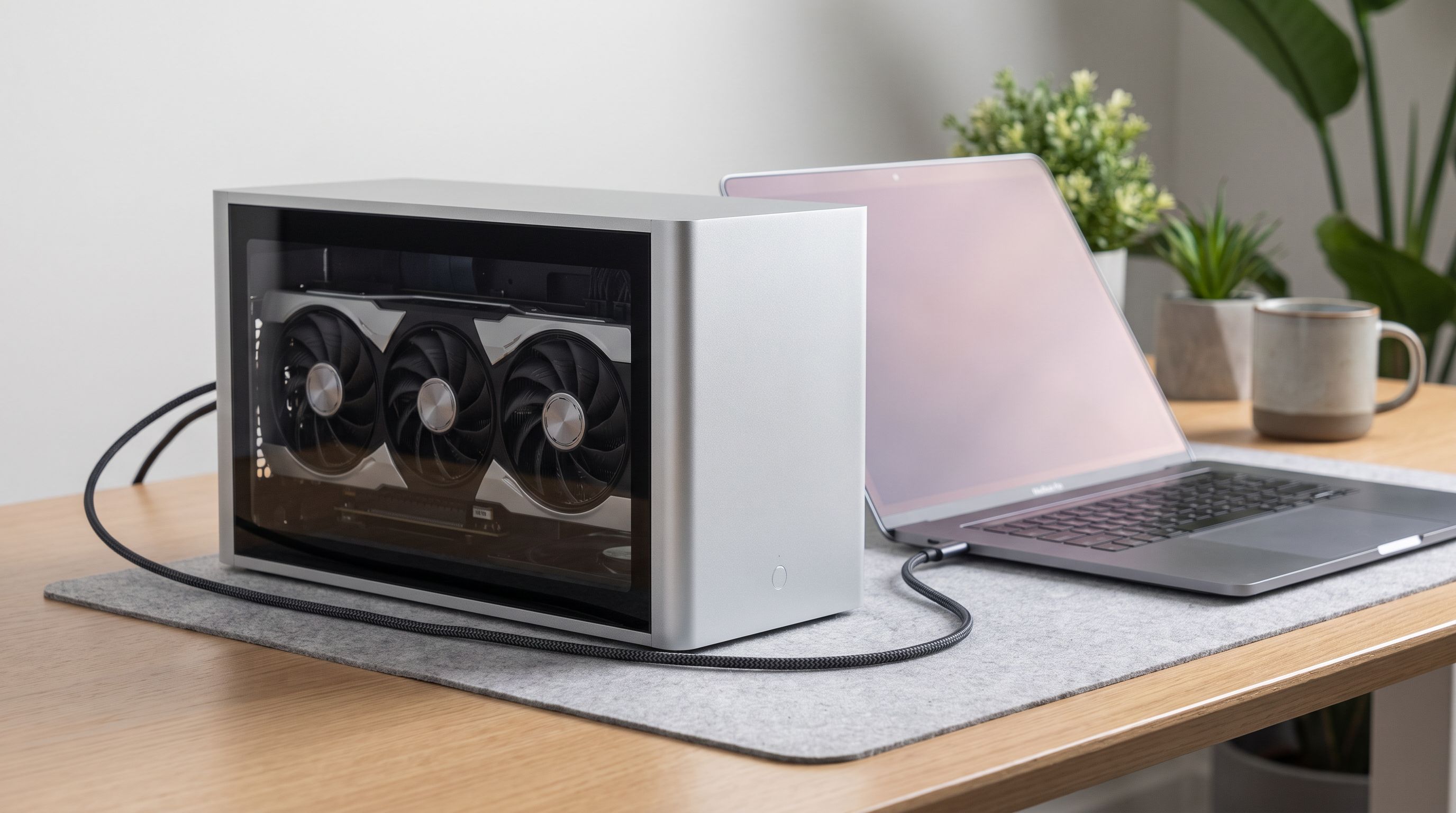
Thin-and-light laptops got genuinely good in 2026. Battery life is excellent, 14-inch chassis are faster than 2021 gaming laptops, and integrated graphics finally handle light gaming. What they still can't do is push a 1440p monitor at high refresh with ray tracing on. That's the gap an eGPU dock is supposed to fill.
The question isn't whether external GPUs work — they do. It's whether a cheap eGPU dock in 2026 gives you enough of the card's performance to justify the money, the desk space, and the cable. The answer depends almost entirely on which interface you pick.
The two camps: Thunderbolt 5 vs OCuLink
Every eGPU enclosure you can buy today funnels a desktop graphics card through a cable that is dramatically narrower than the PCIe x16 slot it was designed for. The differences come down to how narrow, and how much overhead the protocol adds.
Thunderbolt 5 / USB4 v2 is the convenient option. One cable carries PCIe data, DisplayPort video, USB peripherals and laptop charging. Thunderbolt 5 raises total bandwidth substantially over Thunderbolt 4 and adds a bandwidth-boost mode for display-heavy workloads. But the PCIe tunnel underneath is still a tunnel — data gets encapsulated, and that adds latency on top of a link that's narrower than a desktop slot. Thunderbolt 3 and 4 enclosures were widely documented as costing roughly 10–30% of a GPU's desktop performance depending on resolution and title; Thunderbolt 5 narrows that gap but does not close it.
OCuLink is the blunt-instrument option. It's an external PCIe cable standard, typically wired as PCIe 4.0 x4 on the handhelds and mini-PCs that expose it. There's no protocol tunnelling, so overhead is minimal and latency is lower than Thunderbolt. Community benchmarks consistently put OCuLink closer to native desktop performance than USB4/Thunderbolt with the same card. The catch is brutal for ultrabook owners: OCuLink requires a physical OCuLink port or an M.2 slot you can adapt. Most thin-and-light laptops have neither accessible.
USB4 (non-v2) sits in the middle, and it's what a lot of cheaper AMD and Intel ultrabooks actually ship with. It works, but it's the slowest of the three and the most variable between laptop vendors.
Why resolution changes the verdict
The single most useful thing to understand: eGPU bandwidth loss shrinks as resolution rises. At 1080p the CPU and the link are shuttling huge numbers of frames and draw calls per second, so the interface bottleneck is obvious. At 1440p and 4K the GPU spends longer on each frame, the link has more slack, and measured losses fall. If you're buying an eGPU to drive a high-res external monitor, you'll see a larger share of the card's performance than benchmark headlines suggest.
The other big one: use an external display plugged into the eGPU. Routing frames back over the cable to the laptop's internal screen costs you another chunk of performance, sometimes a severe one.
Comparison: what each interface actually gives you
| Interface | Typical PCIe link | Real-world loss vs desktop* | Laptop support | Convenience |
|---|---|---|---|---|
| OCuLink | PCIe 4.0 x4 | Smallest — closest to native | Rare on ultrabooks; common on handhelds/mini-PCs | Separate power, no charging, no USB hub |
| Thunderbolt 5 / USB4 v2 | Tunnelled PCIe, wider than TB4 | Moderate; shrinks at 1440p/4K | Growing on 2025–2026 premium laptops | One cable: video, data, charging |
| Thunderbolt 4 | Tunnelled PCIe ~x4 equivalent | Noticeable, especially at 1080p | Very widespread | One cable |
| USB4 (gen 1) | Tunnelled, vendor-dependent | Largest of the single-cable options | Common on mid-range AMD/Intel laptops | One cable, but implementation varies |
*Directional, based on published third-party benchmarks and owner reports; exact figures vary by GPU, game, resolution and host laptop.
Which dock for which laptop
If your laptop has Thunderbolt 5, buy a Thunderbolt 5 enclosure. The Razer Core X V2 is the cleanest example in 2026: a full-size enclosure that takes a standard desktop card, connects over a single cable, and doesn't make you think about adapters. It's the pick for anyone whose priority is "plug in at my desk, unplug and leave." Note that Razer's current generation moved to an external power brick arrangement rather than a huge internal PSU, so check the power delivery figures against your intended card before buying.
 Best Thunderbolt 5 enclosure · Razer Core X V2 — Check price on Amazon →
If you want maximum frames per dollar and you're willing to tinker, go OCuLink. The Minisforum DEG2 is the dock most often recommended for this, and for good reason: it's an open-frame board with an OCuLink port, it's cheap, and it gets out of the way of the PCIe link. You supply a desktop PSU and a card. On a laptop with a genuine OCuLink port — or an M.2 slot you're comfortable opening the chassis to reach — it will beat a Thunderbolt enclosure running the same GPU.
If you're not sure which port you'll need next year, buy dual-interface. The AOOSTAR AG02 covers both OCuLink and USB4/Thunderbolt connections and includes its own power supply and an enclosed bay, which makes it a tidier desk object than an open board. It's the hedge for people who own both an ultrabook and a handheld.
If you don't want to shop for a graphics card at all, the GMKtec AD-GP1 bundles the GPU into the box. It won't match a high-end desktop card, but it eliminates PSU sizing, card clearance and driver guesswork — a reasonable trade for a secondary machine. At the top end, the Gigabyte AORUS RTX 4090 Gaming Box is the sealed, water-cooled, pre-populated option: expensive, but it charges the laptop over the same cable and needs zero assembly.
Who should actually buy one
Be honest about the maths. An eGPU setup is a dock plus a graphics card plus often a power supply. In a lot of cases that total lands close to the price of a capable gaming laptop or a small desktop — and either of those will be faster than the same GPU throttled through a cable.
An eGPU dock makes sense when:
- You already own a thin laptop you like and don't want a second full machine.
- You already own a desktop GPU sitting idle after an upgrade.
- Your workload is GPU-accelerated creative work or local AI inference, where VRAM capacity matters more than link bandwidth. This is the strongest case for eGPUs in 2026 — a large-VRAM card loads the model once and the narrow link barely matters.
- You game at 1440p or above on an external monitor.
It makes much less sense if you mainly play competitive shooters at 1080p on the laptop's own screen, or if you need the GPU while travelling.
Practical setup notes
- Plug your monitor into the eGPU, not the laptop.
- Check whether your laptop's Thunderbolt port is wired to the CPU or routed through the chipset — the latter can cost performance.
- Hot-plug behaviour is still imperfect. Connecting before boot avoids a lot of driver drama.
- Watch GPU physical length and the enclosure's stated power delivery; modern high-end cards are both long and thirsty.
- On OCuLink, expect to configure things manually and to possibly lose a NVMe slot.
The short version: in 2026, a cheap eGPU dock absolutely can help a thin laptop — just not equally. OCuLink gives you the most performance for the least money and the most hassle. Thunderbolt 5 gives you the least hassle for a modest performance tax that mostly disappears at high resolutions. Pick based on which port your laptop actually has, then buy the biggest GPU your budget allows.
FAQ
Will an eGPU make my thin laptop a gaming laptop? At your desk, broadly yes — with an external monitor and a capable card you'll get a desktop-class experience minus some percentage of frames. Away from the desk, nothing changes.
Is OCuLink always faster than Thunderbolt 5? With the same GPU, OCuLink's lower overhead generally wins. But Thunderbolt 5 narrows the gap considerably versus older Thunderbolt, and at 4K the difference between the two shrinks further.
Can I use an eGPU with a MacBook? Apple Silicon Macs do not support external GPUs for graphics acceleration. eGPU docks here are a Windows and Linux story.
Does the GPU brand matter? Driver maturity does. AMD and NVIDIA both work, but NVIDIA cards have historically had broader community documentation for eGPU quirks on Windows. Check reports for your specific laptop model before committing.
Do I need a separate power supply? With open-frame docks like the Minisforum DEG2, yes — you supply an ATX PSU. Enclosed units such as the AOOSTAR AG02, Razer Core X V2 and the AORUS Gaming Box handle power themselves.
Our picks

MINISFORUM DEG2 USB4 V2 (TBT5 Compatible) & OCuLink eGPU Dock, 80Gbps Dual-Link External GPU Enclosure with M.2 NVMe Slot, Supports Universal ATX/SFX Power Supplies
Open-frame OCuLink dock with a PCIe 4.0 x4 link — the cheapest route to near-desktop GPU performance.
Razer Core X V2 External Graphics Enclosure (eGPU): Compatible with Windows 11 Thunderbolt 4/5 and USB 4 Laptops & Devices - 4 Slot Wide NVIDIA/AMD Graphics Cards PCIe 4.0 Support - 140W PD via USB C
Thunderbolt 5, full-size GPU support and single-cable simplicity for Mac-adjacent and Windows ultrabooks.
AOOSTAR AG02 eGPU Dock
Supports both OCuLink and USB4/Thunderbolt, with a built-in PSU and enclosed card bay.
GMKtec AD-GP1 External Graphics Dock
Integrated GPU and enclosure in one compact box — no card shopping, no separate PSU.
Gigabyte AORUS RTX 4090 Gaming Box
Sealed, water-cooled Thunderbolt box with a high-end GPU pre-installed and a laptop charging pass-through.
Get the best tech deals in your inbox
Join the BytePlaza newsletter for hand-picked gadget deals and new buying guides. No spam, unsubscribe anytime.
Related reads
Video Editing Laptops Under $1,500 in 2026: 4 Real Picks
The best laptop for video editing 2026 under $1,500: we compared GPU power, RAM headroom, colour-accurate displays and 4K export performance across Windows and Mac.

Which Chromebook Should Students Buy in 2026?
We compared Chromebook Plus laptops on screen quality, battery life, AI features and AUE support dates to find the best Chromebook 2026 picks for students.
14-Inch Laptops in 2026: 5 Picks That Actually Commute
The best 14 inch laptop 2026 picks compared on weight, battery, ports and screen — Windows, Mac and Chromebook ultraportables ranked for real commuters.