Which Wireless Keyboard Should Your Mac Use in 2026?
The best wireless keyboard for Mac in 2026: five low-profile picks compared on multi-device switching, key feel, backlighting and real-world battery life.
Reader-supported: we may earn a commission from links on this page, at no extra cost to you. It never affects our picks. Learn more.
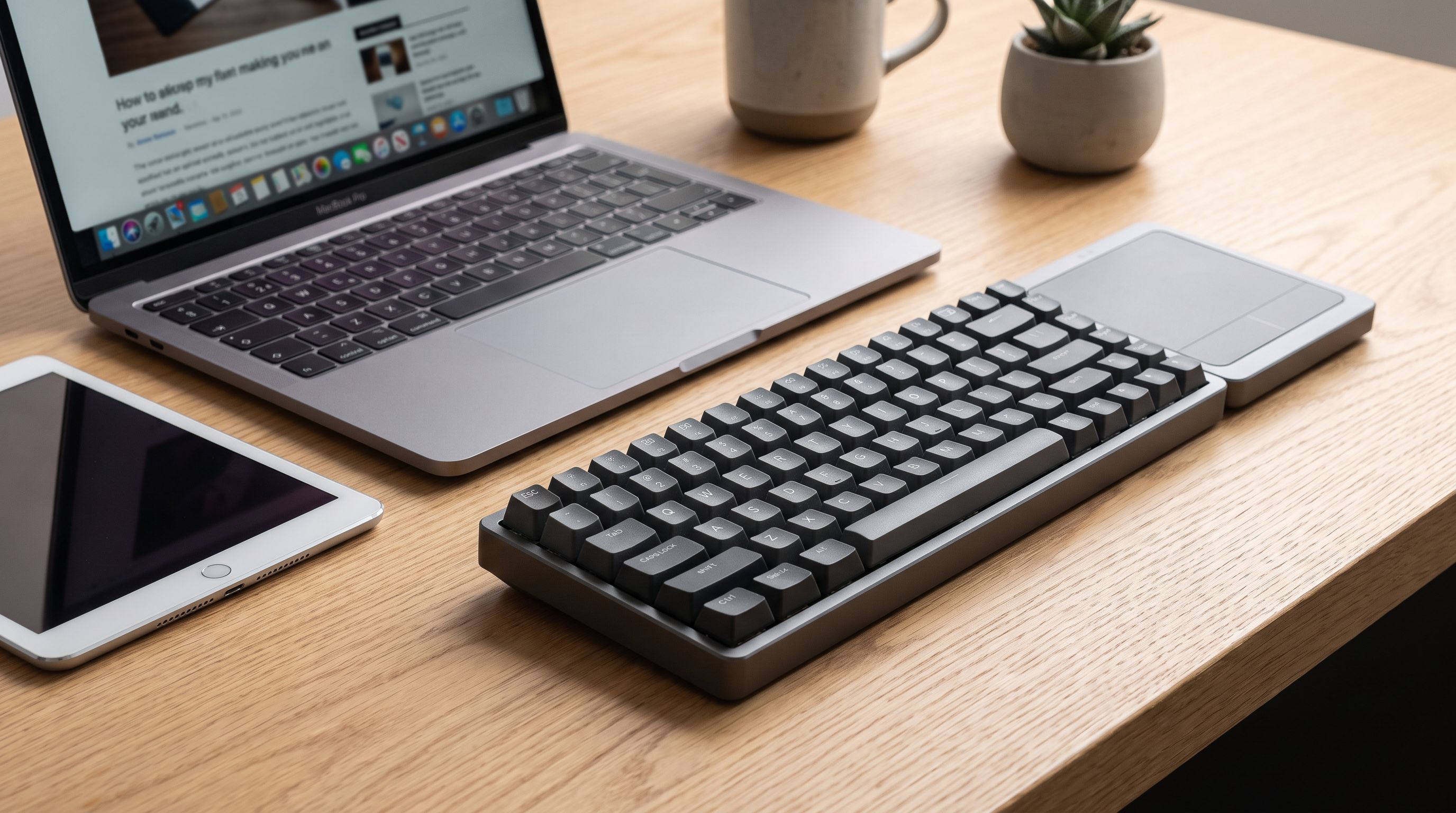
Apple's own keyboards set the expectation for what a Mac keyboard should feel like: thin, quiet, with barely any travel and a layout that matches the shortcuts printed in macOS menus. If you want that same low-profile feel wirelessly — but with more device switching, better backlighting, or a bit more key feedback — there are now genuinely good alternatives.
We compared the leading low-profile wireless keyboards for macOS and iPadOS using manufacturer specifications, independent expert reviews and verified owner feedback, focusing on the things that actually annoy people day to day: how quickly a board reconnects after sleep, whether the modifier keys are laid out correctly, how loud it is on a shared desk, and how often you have to think about charging it.
What "low-profile" actually means here
Low-profile covers two very different typing experiences, and it's worth knowing which one you want before you buy.
Scissor-switch (membrane) boards — the Apple Magic Keyboard, Logitech MX Keys S, Pebble Keys 2 — use the same mechanism as a laptop keyboard. Travel is around 1–2mm, they're near-silent, and they're the thinnest option. If you're moving between a MacBook's built-in keyboard and a desktop board all day, scissor switches keep the muscle memory identical.
 Best overall · Apple Magic Keyboard with Touch ID (USB-C) — Check price on Amazon →
Low-profile mechanical boards — Satechi SM3 Slim, Keychron K3 Max — use short mechanical switches. They're taller and heavier than a Magic Keyboard but far slimmer than a standard mechanical keyboard, and they give you a clearer actuation point plus, on some models, swappable switches. The trade-off is noise and desk height.
 Best for customisation · Keychron K3 Max — Check price on Amazon →
 Best low-profile mechanical · Satechi SM3 Slim Mechanical Keyboard — Check price on Amazon →
Neither is objectively better. Scissor switches win on portability and quiet; low-profile mechanical wins on feedback and longevity.
The picks at a glance
| Keyboard | Switch type | Multi-device | Backlight | Power | Best for |
|---|---|---|---|---|---|
| Apple Magic Keyboard with Touch ID | Scissor | One Mac at a time | No | Rechargeable, ~1 month per charge | Native macOS feel + Touch ID |
| Logitech MX Keys S for Mac | Scissor | 3 devices (Bluetooth/Bolt) | Yes, backlit | Rechargeable USB-C | Multi-device desk work |
| Logitech Pebble Keys 2 K380s | Membrane | 3 devices | No | AAA batteries, very long life | Travel, iPad, tight budgets |
| Satechi SM3 Slim | Low-profile mechanical | Multi-device Bluetooth + USB-C | Yes | Rechargeable USB-C | Mechanical feel, Mac-first layout |
| Keychron K3 Max | Low-profile mechanical (hot-swap) | Bluetooth, 2.4GHz, wired | Yes (RGB) | Rechargeable USB-C | Remapping and tinkering |
 Budget pick · Logitech Pebble Keys 2 K380s — Check price on Amazon →
 Best for multi-device power users · Logitech MX Keys S for Mac — Check price on Amazon →
Apple Magic Keyboard with Touch ID — best overall
Most reviewers still land on the Apple Magic Keyboard as the default recommendation for Mac users, and the reasoning is hard to argue with. Every function key does what the icon says without configuration, Handoff-style pairing takes seconds, and the Touch ID version lets you unlock the Mac, authenticate purchases and fill passwords from a desktop setup — something no third-party keyboard can replicate, because Touch ID on an external keyboard requires Apple silicon and Apple's own hardware.
Battery life is the quiet strength: Apple rates the Magic Keyboard at around a month or more between charges, and the USB-C models charge quickly. The typing feel is the same shallow, crisp scissor action as a modern MacBook.
Two caveats. There's no backlighting, which matters in a dim room. And it pairs to one Mac at a time — switching to an iPad means re-pairing rather than tapping a button. If you live across a Mac and an iPad, look further down this list.
Logitech MX Keys S for Mac — best for multi-device desks
If your desk has a Mac plus an iPad, or a Mac plus a work PC, the MX Keys S for Mac is the most complete option. Three device buttons switch instantly, it works over Bluetooth or Logitech's Bolt USB receiver, and Logitech Flow lets you move the cursor and typing focus between two computers as if they were one machine — including copy-paste across them when paired with a compatible MX mouse.
The Mac edition matters: you get the correct Command/Option legends, a space grey finish that matches Apple hardware, and a layout that doesn't require mental translation. Keys sit in slightly dished "spherically dished" caps that make it easy to find the centre of each key, and the backlighting is proximity-sensing — it wakes when your hands approach.
It's heavier and thicker than a Magic Keyboard, and the backlight is the main battery drain. Logitech quotes months of use with backlighting off, dropping substantially with it on. USB-C charging means a short top-up gets you going again.
Logitech Pebble Keys 2 K380s — budget and travel pick
The Pebble Keys 2 K380s is the successor to the much-loved K380, and it remains the easiest keyboard to recommend to someone who wants one board for a MacBook, an iPad and a phone. Three Easy-Switch keys cycle between paired devices, and macOS/iPadOS layouts are auto-detected so the modifier keys behave correctly. A customisable row of shortcut keys handles emoji, dictation, screenshots and mute.
It runs on replaceable AAA batteries with a very long rated life, which is genuinely convenient for travel — no cable to pack. Typing is quiet and shallow with round keycaps that some people love and others find cramped after years of rectangular keys. There's no backlight and no number pad, but it's thin, light and cheap enough to keep in a bag permanently.
Satechi SM3 Slim — best low-profile mechanical
Satechi has built a reputation for Mac-shaped accessories, and the SM3 Slim is the one to get if you want mechanical feedback without a chunky board. Reviewers have praised it as close to what a slim wireless mechanical productivity keyboard should be: an aluminium top plate, Mac-correct keycaps, backlighting, multi-device Bluetooth pairing and USB-C wired operation when you want zero latency or a dead battery bailout.
Compared to the Magic Keyboard it's noticeably louder and taller. Compared to a full-height mechanical board it's a fraction of the height and blends into a minimalist desk. If you've tried a Magic Keyboard and found it too mushy, this is the natural step up that doesn't wreck the aesthetic.
Keychron K3 Max — best for customisation
The K3 Max is a 75% low-profile mechanical board with hot-swappable switches, Bluetooth plus a 2.4GHz dongle plus wired USB-C, and full QMK/VIA support for remapping any key or building macros. There's a physical Mac/Windows switch and both sets of keycaps in the box.
Choose this if you want to change switches later, want a dedicated function row in a compact footprint, or run Karabiner-style remapping and would rather do it in firmware. It's the most "enthusiast" option here and the least plug-and-play — but it's also the only one that will still be exactly what you want in three years.
How to choose in 60 seconds
- You only use one Mac and want zero friction: Apple Magic Keyboard with Touch ID.
- You switch between a Mac and another computer or an iPad all day: Logitech MX Keys S for Mac.
- You want something cheap for a bag or an iPad: Logitech Pebble Keys 2 K380s.
- You want mechanical feel in a slim shell: Satechi SM3 Slim.
- You want to remap and swap switches: Keychron K3 Max.
Also check the small things: does it have a number pad if you use one, will the height need a wrist rest, and does it charge over USB-C so it shares a cable with everything else on your desk.
FAQ
Do third-party keyboards support Touch ID? No. Touch ID on an external keyboard only works with Apple's own Magic Keyboard with Touch ID, paired to an Apple silicon Mac. Third-party boards can't add it.
Will the function keys work properly on a non-Apple keyboard? On Mac-specific models like the MX Keys S for Mac, Pebble Keys 2 and Satechi SM3 Slim, yes — brightness, Mission Control, media and volume keys are mapped correctly. On generic Windows keyboards you may need to remap keys in System Settings or use the manufacturer's software.
Can I use the same keyboard with my Mac and iPad? Yes, if it supports multi-device Bluetooth switching. The MX Keys S, Pebble Keys 2 K380s, Satechi SM3 Slim and Keychron K3 Max all pair to multiple devices and switch with a keypress. The Apple Magic Keyboard pairs to one device at a time.
Is a Bluetooth or 2.4GHz dongle connection better? Bluetooth keeps ports free and works with iPads and phones. A 2.4GHz receiver (Logi Bolt or Keychron's dongle) is generally more stable and lower latency, and avoids Bluetooth wake-up delays. If both are available, use the dongle at your main desk and Bluetooth on the move.
How long do these last on a charge? Apple rates the Magic Keyboard at roughly a month per charge. Logitech's MX Keys S quotes months with backlighting off and far less with it on. The Pebble Keys 2 runs for a very long time on AAA cells. Backlighting is almost always the deciding factor.
Our picks
Magic Keyboard with Touch ID for Mac Models with Apple Silicon - US English , Bluetooth
The cleanest macOS integration there is, plus Touch ID unlock and roughly a month per charge.
Logitech MX Keys S Mac Wireless Keyboard Fluid Precise - Space Grey | Backlit auto-illumination, Smart Actions shortcuts, 3-device Bluetooth pairing, USB-C rechargeable, 10-day battery life
Backlit, three-device switching and Logitech Flow for typing across a Mac and a second machine.
Logitech Pebble 2 Silent Compact Wireless Keyboard and Mouse Combo - Black | Slim, quiet, portable, customizable, connect via Bluetooth or included Logi Bolt USB-A receiver, Windows, macOS, iPadOS
Featherweight, quiet and switches between three Apple devices with a tap — months on one AAA.
Satechi SM3 Mechanical Keyboard, White LED Backlit, Dark Gray/Gray | 108 Keys Full Size, Wired and Bluetooth, for Mac and Windows
Real mechanical switches in a slim aluminium chassis with Mac keycaps and multi-device pairing.
Keychron K3 Max SE QMK 2.4 GHz Wireless & Bluetooth Mechanical Keyboard | Launcher Support, Ultra-Slim Body Hot-swappable Low-Profile Banana Switch PBT Keycaps for Mac Windows Linux (Aluminum + Wood)
Ultra-slim hot-swappable mechanical board with a Mac layout and QMK/VIA remapping.
Get the best tech deals in your inbox
Join the BytePlaza newsletter for hand-picked gadget deals and new buying guides. No spam, unsubscribe anytime.
Related reads
Thunderbolt 5 Hub in 2026: Who Actually Needs 80Gbps?
Thunderbolt 5 hubs promise 80Gbps and dual-8K displays. We compare the OWC, CalDigit, Kensington and Anker options — and when a cheaper TB4 dock still wins.
Which Kids Tablet Should You Buy in 2026? A Parent's Guide
The best kids tablet 2026 shortlist: Fire HD Kids vs Galaxy Tab A vs an old iPad. We compare durability, parental controls, screen time tools and real costs.
5K Monitors in 2026: 5 Picks That Actually Fix Text
The best 5K monitor picks for 2026, ranked for text clarity on Mac and PC — Apple Studio Display, BenQ PD2730S, Dell, LG UltraFine and a 5K2K ultrawide.