Laser Engravers for Metal in 2026: Fiber Picks Worth Your Money
Looking for the best laser engraver for metal in 2026? We compare top fiber laser engravers for hobbyists and small businesses by power, speed, and value.
Reader-supported: we may earn a commission from links on this page, at no extra cost to you. It never affects our picks. Learn more.
Why Fiber Lasers Are the Gold Standard for Metal Engraving
If your goal is to permanently mark stainless steel, aluminum, titanium, brass, or gold, a fiber laser is the only real option. Diode lasers can darken some bare metals with marking sprays, and CO₂ lasers work well on wood and acrylic, but neither technology can directly engrave metal the way a fiber laser does. Fiber lasers use a doped optical fiber to generate a concentrated beam in the 1060–1070 nm wavelength range — a frequency that metals absorb efficiently. The result is clean, deep marks without coatings or workarounds.
In 2026, the desktop fiber laser market has matured significantly. Machines that once cost five figures are now accessible to hobbyists and small businesses, with enclosed designs, intuitive software, and power levels ranging from 20W to 60W+. Below, we break down what matters and highlight the models worth considering.
What to Look for in a Fiber Laser Engraver
Power (Watts)
Power determines how fast and deep you can engrave. A 20W fiber laser handles surface marking on stainless steel and anodized aluminum comfortably. Step up to 30W for faster throughput and deeper marks. At 50W–60W, you get the speed small production runs demand plus the ability to mark harder alloys and achieve color marking on stainless steel (with MOPA sources).
MOPA vs. Q-Switched
Standard Q-switched fiber lasers are excellent for basic metal marking. MOPA (Master Oscillator Power Amplifier) lasers add adjustable pulse width control, which unlocks color marking on stainless steel and black marking on anodized aluminum without removing the coating. If aesthetic versatility matters — say, for jewelry or branded goods — MOPA is worth the premium.
Work Area and Focus
Most desktop fiber lasers have a marking area between 70×70 mm and 200×200 mm via galvo scan heads. Larger areas are possible with extended lenses, though fine detail may suffer at the edges. Look for an adjustable Z-axis or motorized lift for focusing on objects of varying height.
Software Compatibility
Nearly every desktop fiber laser ships with EZCad2 or LightBurn compatibility. EZCad2 is Windows-only but deeply capable for industrial-style marking. LightBurn offers a friendlier interface and macOS support. Some brands — like xTool — bundle their own proprietary software (xTool Creative Space) alongside third-party options.
Enclosure and Safety
Fiber lasers operate at a wavelength invisible to the human eye, making proper eye protection critical. Enclosed machines with safety interlocks are strongly recommended, especially in shared workspaces. Open-frame galvo setups exist and are cheaper, but they demand disciplined use of OD5+ laser safety goggles and a dedicated workspace.
Top Fiber Laser Engravers for Metal in 2026 — Compared
| Feature | xTool F2 Ultra | ComMarker B6 | ComMarker B4 | OMTech 30W Fiber |
|---|---|---|---|---|
| Laser Type | 60W MOPA Fiber | 60W Fiber | 20W / 30W Fiber | 30W Q-Switched Fiber |
| Wavelength | 1064 nm | 1064 nm | 1064 nm | 1064 nm |
| Marking Area | Up to 300×300 mm (with lens) | 110×110 mm (std) | 110×110 mm (std) | 175×175 mm (std) |
| Color Marking | Yes (MOPA) | Limited | No (Q-switched) | No (Q-switched) |
| Enclosure | Fully enclosed | Fully enclosed | Semi-enclosed | Open-frame (enclosure optional) |
| Software | xTool Creative Space, LightBurn, EZCad2 | EZCad2, LightBurn | EZCad2, LightBurn | EZCad2, LightBurn |
| Best For | All-in-one versatility | Small business production | Budget hobbyist entry | Mid-range production |
 Best budget fiber laser · ComMarker B4 — Check price on Amazon →
 Best for small business · ComMarker B6 — Check price on Amazon →
 Best overall · xTool F2 Ultra — Check price on Amazon →
Our Picks, Explained
xTool F2 Ultra — Best Overall
The xTool F2 Ultra stands out as a true multi-source machine. Its 60W MOPA fiber laser source delivers precise metal engraving with adjustable pulse widths for color marking on stainless steel — a feature owner reviews consistently praise. The fully enclosed design, built-in camera positioning, and compatibility with multiple software platforms make it the most complete package we've seen for 2026. It also supports additional diode and infrared modules, so you're not locked into metal-only work. Based on reviews and owner feedback, it's the top recommendation for anyone who wants a single machine that does it all, though it sits at the higher end of the price spectrum.
ComMarker B6 — Best for Small Business
ComMarker has carved out a reputation in the desktop fiber laser space, and the B6 is their flagship. With a 60W fiber source and an enclosed, portable design, it's built for repeated production runs — think serial numbers, logos on tools, or custom jewelry engraving. Owners frequently highlight its marking speed and consistent output across batches. The compact footprint also makes it practical for small workshops where floor space is at a premium.
ComMarker B4 — Best Budget Fiber Laser
For hobbyists exploring metal engraving without a massive upfront investment, the ComMarker B4 in its 20W or 30W configurations provides genuine fiber laser capability at a more accessible entry point. It handles stainless steel, aluminum, brass, and some plastics with ease. Owner feedback indicates the learning curve is reasonable, especially with the EZCad2 community resources available online. It won't match higher-wattage machines on speed or deep engraving, but for personalization projects and light business use, it delivers solid results.
OMTech 30W Fiber Laser Engraver — Best Mid-Range Value
OMTech is a well-known name in the laser community, and their 30W fiber laser engraver offers a larger standard marking area (175×175 mm) than most competitors at this power level. It uses a proven Q-switched JPT source. The open-frame design keeps costs down but means you'll need to invest in proper safety equipment separately. Based on owner reviews, it's a reliable workhorse for small-batch production and prototyping, with good customer support from OMTech's US-based team.
 Best mid-range value · OMTech 30W Fiber Laser Engraver — Check price on Amazon →
Who Should Buy a Fiber Laser in 2026?
Hobbyists and makers: If you're personalizing knives, dog tags, rings, or tools, a 20W–30W fiber laser like the ComMarker B4 gives you professional-looking results at home.
Small businesses: For product branding, serial marking, or custom engraving services, a 50W–60W machine like the ComMarker B6 or xTool F2 Ultra pays for itself quickly with its speed and consistency.
Multi-material users: If you also work with wood, acrylic, or leather, the xTool F2 Ultra's modular design lets you switch between fiber, diode, and infrared sources without buying separate machines.
Tips Before You Buy
- Factor in extraction. Fiber lasers produce fumes when marking — a fume extractor or ventilation setup is essential, not optional.
- Check material compatibility. Fiber lasers excel on bare metals and some plastics. They won't cut wood or acrylic (that's CO₂ territory).
- Budget for accessories. Rotary attachments for cylindrical objects, additional lenses for different field sizes, and proper safety goggles add to the total cost.
- Software matters. If you're on macOS, confirm LightBurn support before purchasing. EZCad2 is powerful but Windows-only.
FAQ
Can a diode laser engrave metal?
Not directly. Diode lasers (typically 400–450 nm wavelength) can mark metals only with the help of marking sprays like CerMark or LaserBond. The results are surface-level and not as durable as fiber laser engraving.
How deep can a desktop fiber laser engrave?
Most 20W–30W desktop fiber lasers can engrave 0.1–0.3 mm deep on stainless steel with multiple passes. A 60W machine can go deeper and faster, but desktop units are primarily designed for surface marking rather than deep engraving.
Is a MOPA laser worth the extra cost?
If you need color marking on stainless steel or precise black marking on anodized aluminum without damaging the surface, yes. For basic text and logo engraving on bare metal, a standard Q-switched fiber laser is perfectly sufficient and more affordable.
Do I need an enclosure?
Strongly recommended. The 1064 nm wavelength used by fiber lasers is invisible and can cause permanent eye damage instantly. An enclosed machine with a safety interlock is the safest setup, especially if others share your workspace.
How long does a fiber laser source last?
Most fiber laser sources are rated for 100,000+ hours of operation, which effectively means the source will outlast the rest of the machine. This is one of fiber's biggest advantages over CO₂ tubes, which degrade over time and need replacement.
Our picks
xTool F2 Ultra Single 60W MOPA Fiber Laser Engraver
60W MOPA fiber laser with unmatched versatility for metal, plastic, and color marking.
ComMarker B6 60W JPT Mopa Fiber Laser Engraver, Auto Focus Screen, Portable Laser Engraver, Color Marking, 150mm x 150mm, Lightburn Compatible, Laser for Metal, Plastic, Jewelry
Compact 60W fiber laser with fast marking speeds and an enclosed safety design.
ComMarker B4 20W Fiber Laser Engraver,LightBurn Compatible Laser Engraving Machine with 2Lens,2-in-1 Desktop and Handheld Fiber Laser Marking Machine for Jewelry,Sliver,Gold
Affordable 20W–30W fiber laser that handles stainless steel, aluminum, and more.
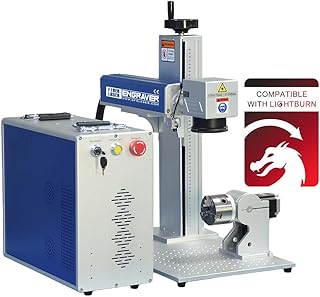
US Stock 60W JPT MOPA M7 Fiber Laser Marking Machine Fiber Laser Engraver Laser Marker 175×175mm with 80mm Rotary Axis Compatible with Lightburn
Premium 60W MOPA source popular in higher-end desktop fiber engravers.
OMTech 30W Fiber Laser Engraver, LightBurn Compatible Laser Marking Machine with Red Dot Pointer for Metal Marking, 5.9"x5.9" Metal Etching Machine with 100,000 Hour Lifespan EZCad Included
Reliable 30W fiber laser with a large marking area and solid owner reviews.
Get the best tech deals in your inbox
Join the BytePlaza newsletter for hand-picked gadget deals and new buying guides. No spam, unsubscribe anytime.
Related reads
USB-C Laptop Chargers in 2026: 140W+ Picks That Replace Your Brick
Looking for the best USB-C laptop charger in 2026? We compare 140W+ GaN chargers with PD 3.1 support, multi-port designs, and compact builds that replace bulky OEM bricks.
Which Laser Printer Should You Buy for Home Office in 2026?
Looking for the best laser printer for home office in 2026? We compared top mono and color models for hybrid workers who need speed, low cost per page, and compact design.
Laser Engravers Under $500 in 2026: 5 Picks Worth Your Money
Looking for the best laser engraver under $500? We compared top diode lasers for hobbyists in 2026 by power, work area, and software compatibility.