5K2K Monitor 2026: Which One Actually Docks Your Laptop?
A practical 2026 guide to 5K2K Thunderbolt monitors that dock a laptop over one cable — who needs 40-inch ultrawide, and which panels earn the price.
Reader-supported: we may earn a commission from links on this page, at no extra cost to you. It never affects our picks. Learn more.
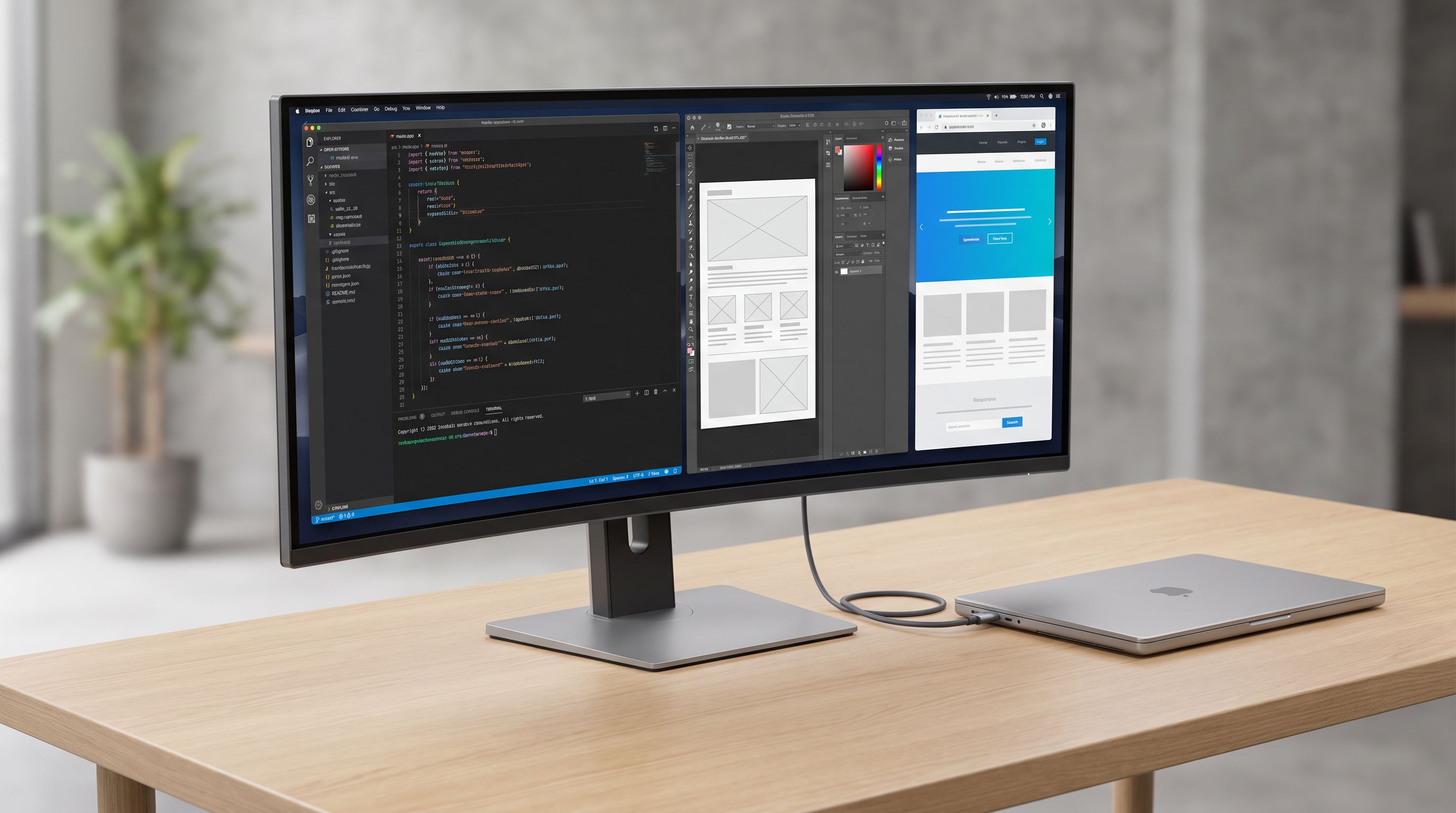
If you work on a laptop and dock it at a desk, the single most disruptive upgrade you can make in 2026 isn't a faster CPU — it's a monitor that is the dock. Plug in one Thunderbolt cable, and the display powers the laptop, drives the pixels, and passes through your keyboard, mouse, webcam, SSD and wired Ethernet. No hub, no cable spaghetti, no "which port was DisplayPort alt mode again?"
The format that's gotten most interesting for this job is 5K2K: 5120 × 2160 pixels in a 21:9 ultrawide shape, usually on a 40-, 45-, or (new for 2026) 39-inch panel. It's a strange-sounding resolution with a very simple explanation: it's two 2560 × 2160 halves side by side, so you get the vertical height of a 4K display plus roughly a third more horizontal room — at a pixel density close enough to 4K that text looks clean without aggressive scaling.
Here's who that actually helps, and which panels earn the premium.
Who should buy a 5K2K docking monitor
You should, if you:
- Work in windows that live side by side: an IDE and a browser, a timeline and a preview, a spreadsheet and a reference doc. 5K2K gives you two genuinely usable ~2.5K halves instead of two cramped ones.
- Dock and undock daily. One-cable docking with 90W+ power delivery removes a laptop charger from your desk entirely.
- Have been running dual 27-inch monitors and hate the bezel down the middle.
- Need wired networking, KVM switching, or lots of USB ports on a laptop that has two ports total.
You probably shouldn't, if you:
- Mostly use one app full screen. A good 27-inch 4K or 5K display is cheaper, sharper per inch, and takes less desk.
- Do color-critical print or film work where a known-good 16:9 reference panel matters more than acreage.
- Sit closer than about 60cm to the screen. At 40 inches wide, the edges get uncomfortably far off-axis.
- Need a competitive gaming display first and a work display second — 21:9 is unsupported or stretched in some esports titles.
IPS vs OLED in 5K2K: the real trade-off
This is the fork in the road for 2026. The mature, sensible option is an LCD: 40-inch Nano IPS panels like the LG UltraWide 40WP95C-W and the Dell UltraSharp U4025QW. They're bright in a sunlit room, immune to burn-in, and they're the ones with the serious docking hardware.
 Best overall · LG UltraWide 40WP95C-W 40 5K2K Thunderbolt Monitor — Check price on Amazon →
The exciting option is OLED. LG's UltraGear 45GX950A-B brought 5K2K to a 45-inch WOLED with a high refresh rate, and at CES 2026 LG showed a 39-inch glossy tandem OLED (the 39GX950B) plus a 52-inch 5K2K monster — pushing brightness and sharpness further than the first OLED generation. Tandem OLED matters because it stacks emissive layers for more sustained brightness, which is exactly where earlier OLED ultrawides struggled with a bright white IDE on screen all day.
The catch: OLED ultrawides are gaming-first products. Their USB-C ports typically deliver less charging wattage than a dedicated Thunderbolt dock monitor, and few include Ethernet. If your priority is "one cable replaces my dock," an IPS panel with Thunderbolt 4 still wins. If your priority is "one display does spreadsheets at 9am and 165Hz games at 9pm," OLED is the reason to compromise.
How we evaluated
BytePlaza doesn't physically test units. We compared manufacturer specifications, independent lab reviews, and verified owner feedback, weighting four things specific to this use case: charging wattage delivered over the single cable, what else the hub actually carries (Ethernet, KVM, number and speed of USB ports), text clarity at typical scaling, and whether the panel behaves well in a bright office rather than a dark gaming room.
The comparison
| Model | Size / Panel | One-cable docking | Best for |
|---|---|---|---|
| LG UltraWide 40WP95C-W | 40" Nano IPS, 5120×2160 | Thunderbolt 4, high-wattage PD, USB hub | The default 5K2K work monitor |
| Dell UltraSharp U4025QW | 40" IPS Black, 5120×2160 | Thunderbolt 4 hub with Ethernet + KVM | Replacing a dock outright |
| LG UltraGear 45GX950A-B | 45" WOLED, 5120×2160, high refresh | USB-C with PD, DP + HDMI | Work by day, games by night |
| Samsung ViewFinity S9 S27C900 | 27" IPS, 5120×2880 | Thunderbolt 4 with PD | Max sharpness, small desk |
| Apple Studio Display | 27" IPS, 5120×2880 | Thunderbolt with PD + USB-C ports | MacBook users who want zero fuss |
 Alternative if you want 16:9 · Samsung ViewFinity S9 S27C900 5K 27 Monitor — Check price on Amazon →
 Best for work and play · LG UltraGear 45GX950A-B 45 5K2K OLED — Check price on Amazon →
LG UltraWide 40WP95C-W — the sane default
The 40WP95C-W is the monitor most people picturing "a 40-inch 5K2K that charges my laptop" are actually picturing. Nano IPS, a gentle curve, Thunderbolt 4 in and out, high-wattage power delivery that keeps most 14-inch and many 16-inch laptops topped up, plus a USB hub and built-in speakers you'll use for calls. It's not a gaming display and doesn't pretend to be. For developers, analysts, and anyone living in two windows, it's the easiest recommendation.
Dell UltraSharp U4025QW — buy this if you hate your dock
Dell's version leans hardest into the docking angle. IPS Black gives it noticeably deeper blacks than standard IPS, which matters more than you'd think on a panel this large in a dim room. But the real argument is the port cluster: Thunderbolt 4 with serious charging headroom, wired Ethernet, a downstream Thunderbolt port for daisy-chaining, and a KVM so a desktop and a laptop can share one keyboard and mouse. If you've been buying a separate dock and a monitor, this collapses both purchases.
LG UltraGear 45GX950A-B — the dual-purpose pick
The 45GX950A-B is where 5K2K stops being purely a productivity format. You get OLED contrast, a high refresh rate, and enough horizontal pixels that text is genuinely readable rather than the fuzzy compromise earlier 1440p ultrawides offered. Treat the USB-C port as a convenience rather than a full dock replacement — check your laptop's charging requirement against the spec before assuming it'll run a power-hungry 16-inch machine. And apply normal OLED hygiene: taskbar auto-hide, screen saver, dark mode.
Samsung ViewFinity S9 and Apple Studio Display — the 16:9 escape hatch
If, after all this, 40 inches of ultrawide sounds like too much desk and too much neck swiveling, 27-inch 5K is the alternative. The Samsung ViewFinity S9 S27C900 and the Apple Studio Display both run 5120 × 2880 at roughly 218 PPI, which means perfect 2× scaling and the sharpest text you can get short of a 6K panel. Both charge a laptop over one cable. The Studio Display is the smoothest experience on macOS — camera, speakers, mics, and no driver fuss — while the ViewFinity S9 is the more flexible choice on Windows. You lose the ultrawide window-tiling superpower; you gain density and a desk you can still see over.
Practical setup notes
- Check your laptop's port. Thunderbolt 4 / USB4 is ideal. A USB-C port with DisplayPort alt mode may still run 5K2K, but possibly at lower refresh or with compression — confirm before buying.
- Use the supplied cable. 5K2K plus power plus data is near the limit of what a generic USB-C cable handles. Most display problems reported by owners trace back to a cheap cable.
- Scaling: 5K2K at 40 inches is comfortable at 100% for many people and at 125% for most. 27-inch 5K wants 200% on macOS and 200% on Windows.
- Arm it. A 40-inch panel benefits enormously from a sturdy monitor arm; most included stands adjust less than you want.
FAQ
Is 5K2K the same as 5K? No. 5K2K is 5120 × 2160 in 21:9. "5K" normally means 5120 × 2880 in 16:9, as on the Apple Studio Display and Samsung ViewFinity S9. Same width, very different height.
Will one Thunderbolt cable really charge my laptop? It depends on wattage. Dock-focused monitors like the LG 40WP95C-W and Dell U4025QW supply enough for most thin-and-light and many 15–16-inch laptops. High-wattage gaming or workstation laptops may charge slowly or not at full load — check the monitor's stated PD output against your laptop's charger rating.
Does 5K2K work well on a Mac? Yes, and modern Apple silicon MacBooks drive these panels over Thunderbolt without issue. Ultrawide scaling on macOS is less elegant than 2× scaling on a 27-inch 5K, which is why the Studio Display remains the cleanest Mac option if sharpness matters more than width.
Should I wait for the 2026 OLED models? If you want glossy tandem OLED like LG's 39-inch 39GX950B, waiting is reasonable — it's the most exciting ultrawide announced at CES 2026. If you need a docking monitor now, the IPS options are mature, cheaper, and better at the docking job specifically.
Our picks
LG 40U990A-W 40-inch Ultrafine evo 5K2K WUHD (5120 x 2160) Nano IPS Curved Monitor, Thunderbolt 5, DisplayHDR 600, Built-in Speaker, 120Hz, HDMI 2.1, DP 2.1, USB C, Tilt/Height/Swivel Stand, White
The classic one-cable 5K2K workhorse: Nano IPS, Thunderbolt 4 with 96W charging, and a built-in hub.
LG 45GX950A-B 45-inch Ultragear 5K2K WUHD (5120 x 2160) OLED Curved Gaming Monitor, Dual-Mode, 165Hz, 0.03ms, NVIDIA G-Sync, AMD FreeSync Premium Pro, HDR True Black 400, USB Type-C 90W, DP2.1
5K2K WOLED at 165Hz with a USB-C/DP/HDMI hub — sharp for desktop work, fast enough for games.

Dell U4025QW Monitor Bundle
Thunderbolt 4 hub with high-wattage charging, RJ45 Ethernet and KVM — the most complete dock here.
Samsung 27" ViewFinity S8 (S80HF) Series High-Resolution Monitor
27-inch 5K at 218 PPI with Thunderbolt 4 and 90W charging if an ultrawide is too much desk.
Apple Studio Display 27" 5K
Reference-grade 5K panel, 96W charging over Thunderbolt and three downstream USB-C ports.
Get the best tech deals in your inbox
Join the BytePlaza newsletter for hand-picked gadget deals and new buying guides. No spam, unsubscribe anytime.
Related reads
34" vs 49" Ultrawide Monitors: Which One Fits Your Desk in 2026?
The best ultrawide monitor for 2026 depends on desk depth, not just specs. We compare 34-inch and 49-inch OLED and IPS picks for work-from-home productivity.
Portable Monitors Under $200 in 2026: 4 Travel Picks
We compared budget 15.6-inch USB-C portable monitors for 2026 — panel type, brightness claims, port layout and weight — to find the best portable monitor under $200.
Ultrawide OLED in 2026: Is 34" Enough, or Go 45"?
We compared the best ultrawide OLED monitors of 2026 — QD-OLED vs WOLED, 34-inch vs 45-inch — to help gamers and creators spend smart on curve, pixels and hertz.