Under Desk Keyboard Tray 2026: Clamp-On vs Bolt-On
Which under desk keyboard tray should you buy in 2026? We compare clamp-on and bolt-on sliding trays by travel, tilt range, width and weight limits.
Reader-supported: we may earn a commission from links on this page, at no extra cost to you. It never affects our picks. Learn more.
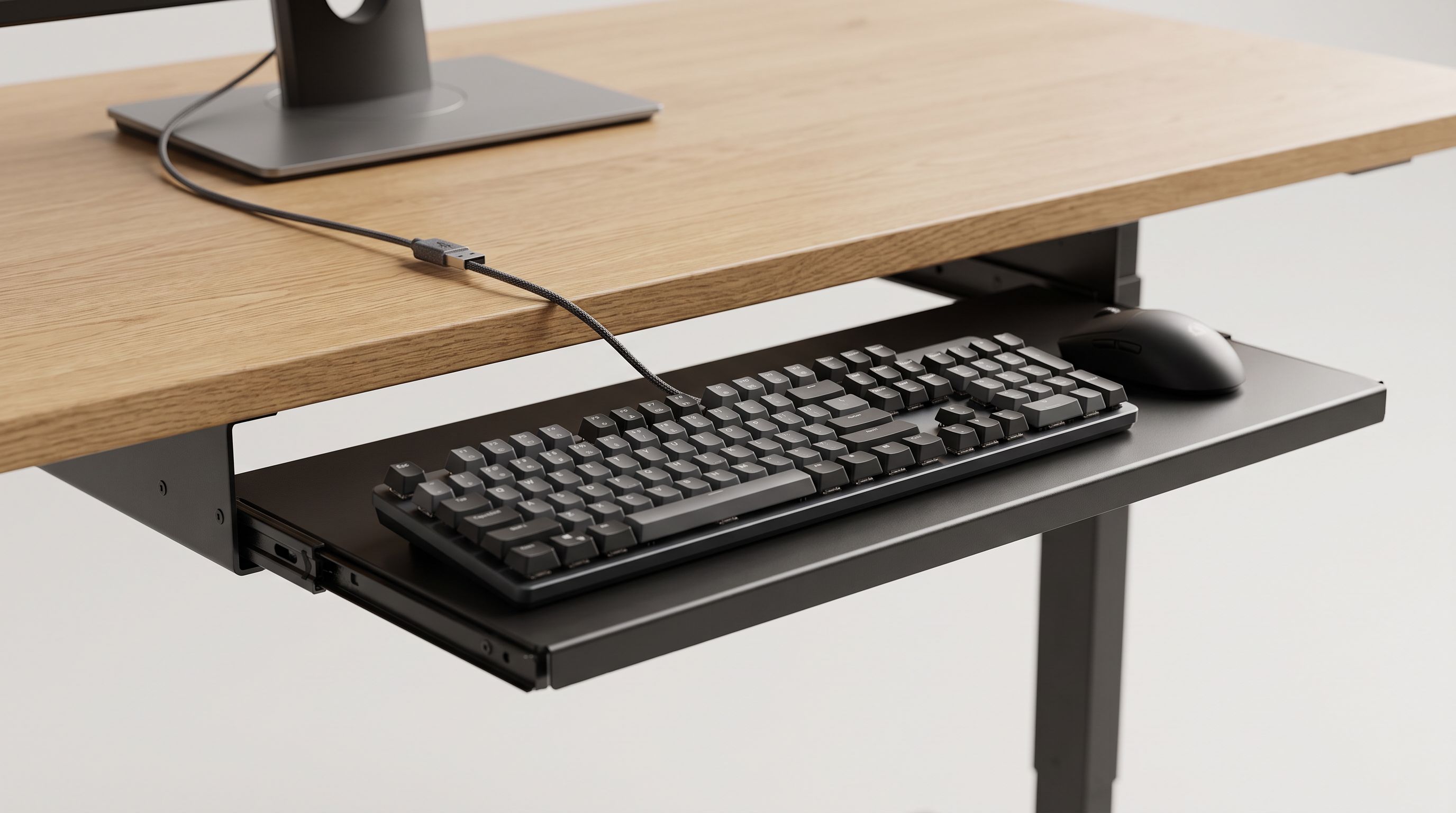
Most desks are built for writing, not typing. Standard desk height lands somewhere around 29–30 inches, which puts a keyboard several inches above where your forearms actually want to be. The result is the classic office posture problem: shoulders shrugged, wrists bent upward, elbows floating. An under-desk keyboard tray is the cheapest fix for that — usually far cheaper than a new sit-stand desk — and it buys back desk surface at the same time.
But trays vary enormously in the things that matter: how far they slide, whether they tilt negatively (front edge up, back edge down), how wide the platform is, how much weight the arm can carry, and whether they mount with clamps or screws. We compared the most widely sold models for 2026 against those criteria, using manufacturer specs plus patterns in verified owner feedback — particularly complaints about sag, wobble, and knee clearance, which are the three failure modes that show up again and again.
The first decision: clamp-on or bolt-on
This is the fork in the road, and it's mostly decided by your desk and your lease.
Clamp-on trays grip the front edge of the desktop with two C-clamps. No drilling, no screws, fully reversible — the right answer for renters, laminate IKEA desks, glass-topped desks, and anything with a hollow or particle-board underside that won't hold a screw thread. The trade-off is that clamps need a clean, flat, unobstructed front lip, typically around 1–1.5 inches thick, and they push the tray's mounting point forward, which can slightly reduce how far back the tray retracts.
Bolt-on trays screw directly into the underside of the desk, usually with a mounting plate and a track that lets the tray slide in and out. They're more rigid, they usually offer longer travel, and they can be positioned further back under the desk. You need solid wood, thick plywood, or a desktop with enough material to take a wood screw without blowing through the top surface. Measure twice: screwing through a 3/4-inch top with 1-inch screws ruins a desk permanently.
A third style, the slide-out drawer, is really a storage-first product. It gives you a flat shelf that tucks the keyboard away but typically offers no tilt and limited height adjustment. Good for decluttering, less good for ergonomics.
What actually matters in the specs
Negative tilt. This is the single most ergonomically important feature. A tray that only tilts positively (back edge up) replicates the bad posture of a desktop keyboard. You want the front edge higher than the back, so your wrists sit flat or slightly extended downward. Look for trays advertising tilt adjustment in both directions — the HUANUO Adjustable Under Desk Keyboard Tray and Mount-It! MI-7137 Clamp-On Keyboard Tray both offer a tilt range rather than a single fixed angle.
 Best overall · HUANUO Adjustable Under Desk Keyboard Tray — Check price on Amazon →
Travel (slide distance). Short travel means the keyboard never fully disappears under the desk, so you lose the "reclaim my desktop" benefit. Long travel means you can push the tray back when you're writing by hand or video calling. Check whether the stated figure is the full rail length or usable travel — they're not always the same.
Platform width and depth. Full-size keyboard plus mouse on the same platform needs roughly 25+ inches of width. A tenkeyless or 65% board plus mouse can work in the low 20s. If you use a large gaming desk mat (the 31.5 x 16-inch size is extremely common), almost no standard tray will take it flat — the VIVO Large Under Desk Keyboard Tray is the widest mainstream option and gets you closest, but expect overhang on the deepest mats.
Weight capacity. Plastic trays with a single centre rail sag under heavy aluminium-case mechanical keyboards. If your board weighs more than a couple of pounds, prioritise steel rails, dual-track designs, and published load ratings.
Knee clearance. Every tray steals vertical space. If you already have a tight desk, a slim drawer like the Fellowes Designer Suites Underdesk Keyboard Drawer intrudes less than a thick articulating arm.
The picks compared
| Model | Mount type | Tilt | Best for | Watch out for |
|---|---|---|---|---|
| HUANUO Adjustable Under Desk Keyboard Tray | Clamp or screw | Positive and negative | Most desks, most people | Clamp needs clear front edge |
| Mount-It! MI-7137 Clamp-On Keyboard Tray | Clamp only | Adjustable | Renters, IKEA desks, no drilling | Desk lip thickness limits |
| BONTEC Under Desk Keyboard Tray Slide-Out Drawer | Clamp | Minimal / flat | Budget builds, light keyboards | Limited ergonomic adjustment |
| VIVO Large Under Desk Keyboard Tray (MOUNT-KB05E) | Screw-mount | Fixed/limited | Wide platforms, mouse + board | Needs solid desktop |
| Fellowes Designer Suites Underdesk Keyboard Drawer | Screw-mount | Flat | Shallow desks, tight knee room | Storage-first, not full ergo |
 Budget pick · BONTEC Under Desk Keyboard Tray Slide-Out Drawer — Check price on Amazon →
Best overall: HUANUO Adjustable Under Desk Keyboard Tray
This is the one we'd recommend to most people, because it's the only widely available tray in its class that covers all three adjustment axes most users need: height, tilt in both directions, and slide. Owner feedback consistently praises the adjustment range; the recurring criticism is that assembly instructions are terse and the clamp needs a genuinely flat desk lip. If your desk has a decorative bullnose edge or a reinforcing rail along the front, check clearance before ordering.
Best clamp-on: Mount-It! MI-7137 Clamp-On Keyboard Tray
The Mount-It! clamp mount comes up repeatedly in user discussions as the one that stays put on IKEA desktops — a meaningful endorsement, since thin laminate tops are where cheap clamps fail. Zero holes, fully removable, and sturdy enough that the platform doesn't bounce while typing. Choose this if you rent, or if you've already got a desk you refuse to drill.
Budget pick: BONTEC Under Desk Keyboard Tray Slide-Out Drawer
The BONTEC is a straightforward slide-out drawer with clamps included, aimed at people who mostly want the keyboard out of sight and a little lower than desk height. It won't give you a proper negative-tilt typing position, so treat it as a space-saver first and an ergonomics upgrade second. For a light keyboard on a tidy desk, it does the job.
Best for big mats and gaming: VIVO Large Under Desk Keyboard Tray
If your complaint about every other tray is "my mouse doesn't fit," this is the answer. The extra width lets a full-size board and a mouse share one surface, which keeps both at the same height — ergonomically better than a keyboard on a tray and a mouse up on the desk. It's a screw-mount design, so confirm your desktop can take fasteners.
Best slim drawer: Fellowes Designer Suites Underdesk Keyboard Drawer
A low-profile bolt-on drawer for desks where you simply cannot lose two inches of knee room. It's conservative — flat platform, modest travel — but it's tidy, well-finished, and a sensible pick for a home office that doubles as a dining area.
Installation tips that prevent returns
- Measure the front lip before buying a clamp model: thickness, depth of flat area, and anything bolted underneath.
- Dry-fit the track under the desk and sit down before you tighten anything. Mount position determines knee clearance.
- Check screw length against desktop thickness on bolt-on models. Painter's tape wrapped around the drill bit makes a cheap depth stop.
- Set the height so your elbows sit at roughly 90–100 degrees with shoulders relaxed, then add a touch of negative tilt.
- Route cables with slack. A tray that slides will yank a taut keyboard cable or a short USB hub lead.
FAQ
Will a keyboard tray fit a sit-stand desk? Often yes, but check the frame. Many standing desks have crossbars or control boxes under the front edge that block both clamps and mounting plates. Measure the clear space before ordering.
Do I need negative tilt? If you type for hours, yes. A flat or positively tilted keyboard forces wrist extension. Negative tilt is the main ergonomic reason to buy a tray rather than just lowering your chair.
Can I use a tray with a glass desk? Only a clamp-on model, and only if the manufacturer allows glass. Never drill. Use the rubber pads supplied and don't overtighten.
Will a heavy mechanical keyboard sag the tray? Cheap single-rail plastic trays can. Look for steel tracks and a published weight rating, and keep the heaviest mass over the rail rather than at the platform's front edge.
Does a tray work for a laptop? Usually not well — a laptop on a low tray puts the screen far too low. Better to raise the laptop on a stand and put an external keyboard on the tray.
Our picks
HUANUO Under Desk Keyboard Tray, 25 x 9.8 Inch Slide-Out Drawer
Height and tilt adjustment in both directions, generous platform, and a clamp or screw mounting choice.
Mount-It! MI-7137 Clamp-On Keyboard Tray
Rock-solid clamp mount that survives IKEA desks and apartment leases without a single screw hole.
BONTEC Under Desk Keyboard Tray, Pull-Out Keyboard & Mouse Platform
Simple slide-out drawer with clamp hardware included — cheap fix for cramped desks.
VIVO Large Under Desk Keyboard Tray (MOUNT-KB05E)
Extra-wide platform that swallows a full-size board plus mouse on one surface.
Fellowes Designer Suites Underdesk Keyboard Drawer
Low-profile bolt-on drawer for shallow desks where every inch of knee clearance counts.
Get the best tech deals in your inbox
Join the BytePlaza newsletter for hand-picked gadget deals and new buying guides. No spam, unsubscribe anytime.
Related reads
Standing Desk Converter 2026: Which Riser Fits Your Desk?
Standing desk converter 2026 guide: compare electric vs Z-lift vs X-lift risers by footprint, weight capacity, and desk depth so you buy one that actually fits.

The Median Laptop Stand Costs $19.99 in 2026
The median laptop stand costs $19.99, with 89% of 36 analyzed Amazon listings priced between $7 and $38 — and a 19x spread from $6.79 to $129.99.

Smart Mug Warmer 2026: 4 Picks That Actually Hold Temp
We compared smart mug warmers and heated mugs for 2026 on hold time, app control, battery life and real owner feedback. Four picks for desks, commutes and tea drinkers.