Smart Doorbell Chimes in 2026: 4 Picks That Get Heard
The best smart doorbell chime fixes the alerts you miss in the basement or backyard. We compare Ring, Google Nest, Aqara and Wi-Fi plug-in chimes for 2026.
Reader-supported: we may earn a commission from links on this page, at no extra cost to you. It never affects our picks. Learn more.
You bought a video doorbell so you'd never miss a delivery. Then you went down to the laundry room, or out to the garden with headphones in, and the driver left a "sorry we missed you" card anyway.
That's not a doorbell problem. It's a chime problem. Most video doorbells — the Google Nest Doorbell (3rd Gen), Ring's Battery Doorbell 2K, the Eufy E340, the Tapo D225 — push a notification to your phone and make a small noise at the doorbell itself. If your phone is on silent, in another room, or your house has thick walls and a basement, that alert may as well not exist.
A smart doorbell chime is the fix: a small speaker, usually plug-in, that rings loudly somewhere you actually are. It's the cheapest, most overlooked upgrade in the whole smart-home category. Here's how we'd choose one in 2026.
How we picked
BytePlaza doesn't physically test units. We compared current manufacturer specs, independent reviews, and verified owner feedback across the major doorbell ecosystems, weighting four things:
- Compatibility that's real, not theoretical. Most chimes only work with their own brand's doorbell. This is the number one cause of returns.
- Loudness and tone options. A chime you can't hear over a washing machine is useless. Adjustable volume matters more than the number of ringtones.
- Bonus function. Some chimes also extend Wi-Fi or act as a smart-home hub — real added value for the same outlet.
- Reliability of the alert path. Chimes that ring locally (over your LAN) beat ones that depend on a cloud round-trip.
The picks at a glance
| Chime | Works with | Power | Standout feature | Best for |
|---|---|---|---|---|
| Ring Chime Pro (2nd Gen) | Ring doorbells & cameras | Plug-in (mains) | Built-in Wi-Fi extender for Ring devices | Ring owners with a weak signal at the front door |
| Ring Chime (2nd Gen) | Ring doorbells & cameras | Plug-in (mains) | Compact, cheap, stackable across rooms | Adding a second or third alert point |
| Google Nest Mini (2nd Gen) | Nest Doorbell (wired & battery) | Plug-in (USB power adapter) | Spoken announcements ("Someone's at the front door") | Google/Nest households |
| Aqara Chime Hub M100 | Aqara doorbells; Matter/Thread devices | Plug-in (mains) | Doubles as a Thread border router and Matter hub | Mixed-brand smart homes |
| Amazon Echo Pop | Ring & Blink doorbells via Alexa | Plug-in (mains) | Cheapest way to add announcements anywhere | Budget multi-room coverage |
 Budget pick · Amazon Echo Pop — Check price on Amazon →
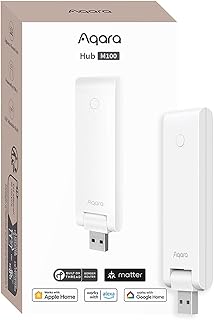 Best for multi-brand smart homes · Aqara Chime Hub M100 — Check price on Amazon →
 Best for Nest doorbell owners · Google Nest Mini (2nd Gen) — Check price on Amazon →
 Best for extra rooms · Ring Chime (2nd Gen) — Check price on Amazon →
 Best overall · Ring Chime Pro (2nd Gen) — Check price on Amazon →
Best overall: Ring Chime Pro (2nd Gen)
If you're in the Ring ecosystem — and a huge number of people are, given how many Ring Battery Doorbell and Wired Doorbell units are in the wild — the Chime Pro is the one to get first. It plugs into a standard outlet, rings with adjustable volume and a choice of tones, and adds a Wi-Fi extender specifically tuned for Ring devices.
That extender matters more than people expect. A lot of "my doorbell is slow" and "my notifications arrive late" complaints trace back to a marginal Wi-Fi signal at the front door, where a router two rooms away is fighting brick, insulation and a metal door frame. Placing the Chime Pro in a hallway between your router and the door both solves the signal problem and gives you an audible ring in a central part of the house.
Caveat, and it's an important one: this is a Ring-only device. It won't chime for a Nest, Eufy, Aqara or Tapo doorbell. Also note that some Ring features (like ringing for motion events, or certain alert customisations) depend on your Ring plan and app settings rather than the chime hardware.
Best for extra rooms: Ring Chime (2nd Gen)
Once your main living area is covered, the goal is coverage, not features. The standard Ring Chime is the same core idea without the Wi-Fi extender, in a smaller, cheaper package. Buy one for the basement, one for the upstairs landing, one for the kitchen near the back door.
Owner feedback consistently lands on the same advice: two cheap chimes placed well beat one expensive chime placed badly. Sound doesn't travel around corners or down stairwells nearly as well as you'd assume, and a closed door knocks out a surprising amount of volume.
Practical placement tips that apply to any chime:
- Put it at the top of a basement staircase, not the bottom — sound travels down better than up.
- Avoid outlets behind furniture or inside cabinets; you can lose a lot of perceived loudness.
- If you want backyard coverage, an outlet near a kitchen window or in a garage/conservatory usually carries better than one deep in the house.
Best for Nest doorbell owners: Google Nest Mini (2nd Gen)
Google doesn't sell a dedicated plug-in chime puck. Instead, Nest Doorbells use Google speakers as chimes — and the Nest Mini is the cheap, small way in. Link it in the Google Home app and it will announce doorbell presses, with the option of a spoken announcement rather than just a tone, which is genuinely useful if you have multiple entrances.
The trade-off versus a dedicated chime: a smart speaker is doing more work, so it's dependent on your network and Google account, and there's a short delay in some setups. The upside is that the same device plays music, sets timers and answers questions — so the "chime" is effectively free in rooms where you'd want a speaker anyway. Scatter a couple around the house and you've solved the basement problem for less than a premium standalone chime.
Nest Doorbells also support a traditional wired mechanical chime if you have existing doorbell wiring; that's worth enabling alongside a speaker for redundancy.
Best for multi-brand homes: Aqara Chime Hub M100
If your smart home is a patchwork — an Aqara G410 or G400 doorbell, some Matter bulbs, a few Thread sensors — the Aqara Chime Hub M100 earns its outlet. It acts as a chime for Aqara doorbell events, but it's also a Matter controller and Thread border router, which can stabilise the rest of your low-power devices.
It's the most "smart home nerd" pick here. If you only own a Ring or Nest doorbell and nothing else, skip it. If you're building toward Matter and want one box that handles alerts, automations and Thread routing, it's a smart consolidation.
Budget pick: Amazon Echo Pop
The cheapest route to whole-home doorbell audio, if you own a Ring or Blink doorbell, is an Alexa speaker. The Echo Pop is tiny, inexpensive, and will make an announcement when someone presses the doorbell. Owners of compatible Ring doorbells can also pull up the live view on an Echo Show.
The same caveat as the Nest Mini applies: it's cloud-dependent, so alerts can lag a second or two behind a dedicated chime, and it's tied to Alexa being signed in and working. But for covering a spare room, garage or home office on the cheap, it's hard to argue with.
What about a universal chime?
There are third-party "works with any doorbell" chimes that detect the sound of your existing doorbell or piggyback on old wiring. They exist, they occasionally work well, and they're a last resort. False triggers and missed triggers are common in owner reports. If your doorbell brand sells a first-party chime or supports a speaker line, use that path instead — the alert travels over your network rather than being inferred from a noise.
Quick buying checklist
- Confirm the brand match first. Ring chimes for Ring. Google speakers for Nest. Aqara for Aqara. Eufy and Tapo doorbells typically ship with their own plug-in chime in the box — check before buying anything extra.
- Count your dead zones. Basement, garage, top floor, garden-adjacent room. Buy one chime per dead zone; they're cheap.
- Check if you have a signal problem, not a sound problem. Late notifications usually mean Wi-Fi, and a Chime Pro or a mesh node fixes that better than more volume.
- Keep a wired mechanical chime if you have one. It's the most reliable fallback when the internet is down.
FAQ
Do I need a smart chime if my doorbell already sends phone alerts?
If you always have your phone on you with notifications on, no. In practice, most missed deliveries happen because a phone was on silent, charging in another room, or the alert got buried. A chime is a second, physical alert path.
Will a Ring Chime work with a Nest or Eufy doorbell?
No. Ring chimes only pair with Ring devices. Chimes are almost universally locked to their own ecosystem, so match the brand before you buy.
Does a smart doorbell chime need a subscription?
The chime itself doesn't. But some alert behaviours — particularly motion-triggered alerts versus simple button presses — can depend on your doorbell's plan tier. Button-press ringing works without a subscription on the major brands.
Can a chime fix slow or delayed notifications?
Sometimes. If the delay is caused by weak Wi-Fi at the door, a chime with a built-in extender like the Ring Chime Pro can help. If the delay is your phone's battery optimisation settings or a congested network, the chime won't change it.
How many chimes do I need?
One per floor is a good baseline; add one for the basement and one near any outdoor space you use regularly. They're inexpensive enough that over-covering is cheaper than missing a parcel.
Do battery-powered doorbells work with plug-in chimes?
Yes — the chime communicates over Wi-Fi, not doorbell wiring, so battery doorbells like the Ring Battery Doorbell 2K pair with plug-in chimes normally.
Our picks
Like-New Ring Chime Pro
Loud plug-in chime plus a Wi-Fi extender for Ring doorbells — fixes range and audibility in one device.
Ring Chime — Enhanced audio for real-time alerts you can hear from anywhere, easy plug-in setup, simple wifi & Bluetooth connectivity, sleek design, White
Cheap, compact plug-in chime with adjustable volume and tones — ideal for adding a second or third alert point.
Google Nest Mini 2nd Gen - Wireless Bluetooth Speaker (Aqua)
Doubles as a Nest Doorbell chime with spoken announcements, plus a full smart speaker everywhere else.
Aqara Smart Hub M100 for Home Automation, Matter Controller, Wi-Fi
Matter/Thread border-router hub that also acts as a chime for Aqara doorbells and automations.
Amazon Echo Dot (newest model) - Vibrant sounding speaker, Designed for Alexa+, Great for bedrooms, dining rooms and offices, Deep Sea Blue
An inexpensive Alexa speaker that announces Ring and Blink doorbell presses in any room you plug it in.
Get the best tech deals in your inbox
Join the BytePlaza newsletter for hand-picked gadget deals and new buying guides. No spam, unsubscribe anytime.
Related reads
Best Video Doorbell 2026: Wired vs Battery Compared
The best video doorbell in 2026, compared on wired vs battery power, subscription costs, local storage, head-to-toe field of view and package detection.
Smart Window Sensors in 2026: 4 Picks That Actually Hold Up
Which smart window sensor should you buy in 2026? We compare Matter, Thread and Zigbee contact sensors on battery life, hub needs and owner-reported reliability.
Baby Monitors in 2026: Wi-Fi or Closed-Circuit?
Wi-Fi vs closed-circuit baby monitors compared on privacy, range and battery life — plus the best baby monitor 2026 picks for every kind of parent.