Best Streaming Device 2026: Fire TV vs Roku vs Apple TV
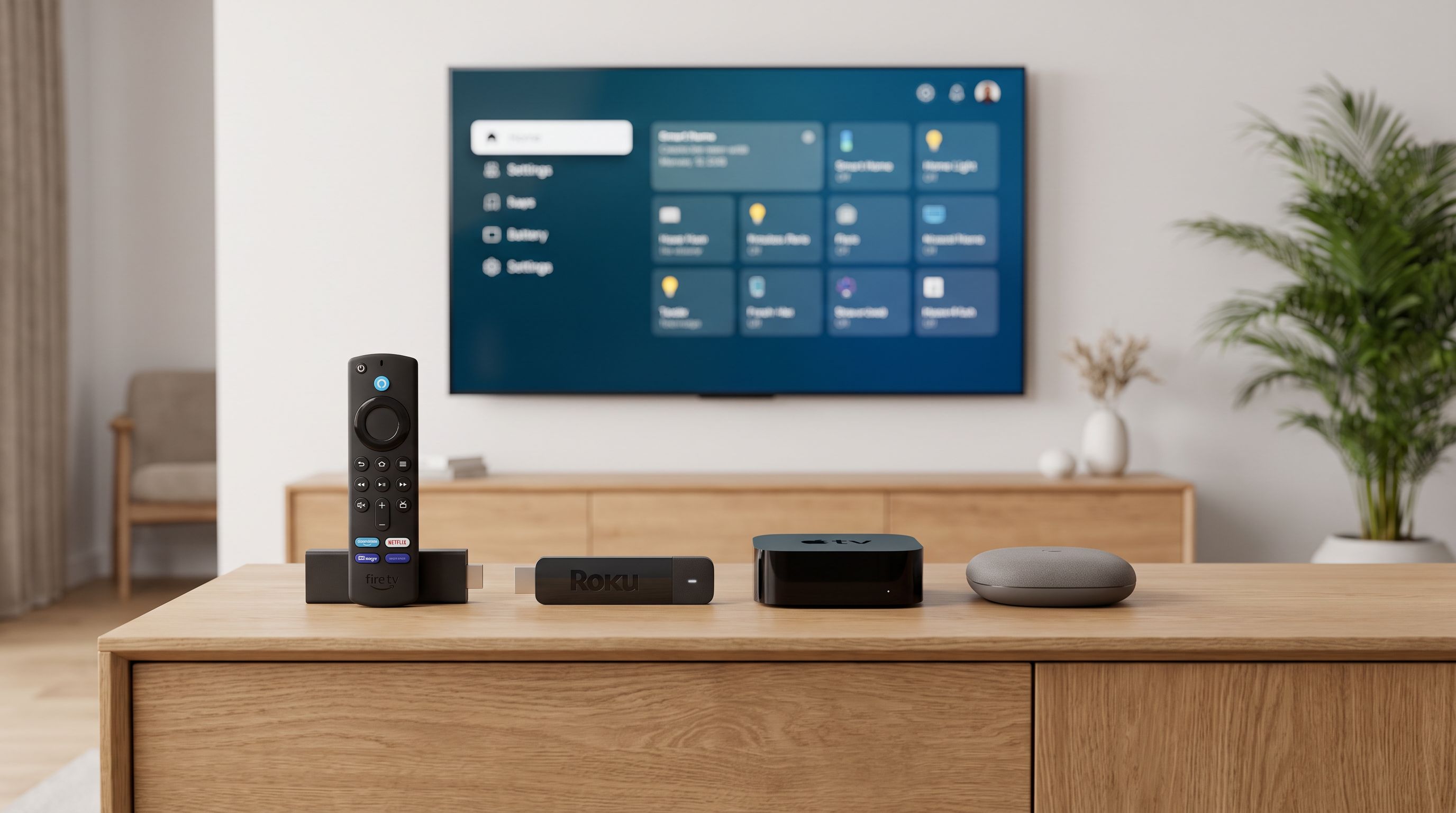
We compare the best streaming device options for 2026 — Fire TV Stick 4K Max, Roku Streaming Stick 4K, Apple TV 4K and Google TV Streamer — on Dolby Vision, ads and speed.
Reader-supported: we may earn a commission from links on this page, at no extra cost to you. It never affects our picks. Learn more.
Most smart TVs ship with a platform that gets slower every year. Apps take longer to open, the home screen fills with sponsored rows, and older sets eventually lose support for the apps you actually use. A $40–$150 streaming device fixes all of that for a fraction of the cost of a new TV.
The question isn't really "which stick is fastest" — in 2026, nearly all of them decode 4K HDR without breaking a sweat. The question is which platform you want to look at every night, and whether it matches your TV's HDR format, your audio gear and your smart home.
Here's how the four main platforms stack up, plus a fifth option for home theater obsessives.
The short answer
- Want the cleanest, fastest experience and don't mind paying more: Apple TV 4K (3rd generation).
- Already deep in Amazon (Prime Video, Alexa, Echo speakers): Amazon Fire TV Stick 4K Max.
- Want simple and cheap, with no learning curve: Roku Streaming Stick 4K.
- Want your streamer to double as a smart home hub: Google TV Streamer (4K).
- Serious home theater, Plex library, local files: NVIDIA SHIELD TV Pro.
 Premium pick for home theater · NVIDIA SHIELD TV Pro — Check price on Amazon →
 Best for smart home control · Google TV Streamer (4K) — Check price on Amazon →
 Best budget pick · Roku Streaming Stick 4K — Check price on Amazon →
 Best for Prime and Alexa homes · Amazon Fire TV Stick 4K Max — Check price on Amazon →
 Best overall · Apple TV 4K (3rd generation, 128GB Wi-Fi + Ethernet) — Check price on Amazon →
Comparison at a glance
| Apple TV 4K (3rd gen) | Fire TV Stick 4K Max | Roku Streaming Stick 4K | Google TV Streamer (4K) | NVIDIA SHIELD TV Pro | |
|---|---|---|---|---|---|
| Form factor | Set-top box | Stick | Stick | Small box/puck | Set-top box |
| Dolby Vision | Yes | Yes | Yes | Yes | Yes |
| HDR10+ | No | Yes | Yes (model-dependent) | Yes | Yes |
| Dolby Atmos | Yes | Yes | Yes | Yes | Yes |
| Ethernet port | On the 128GB Wi-Fi + Ethernet model | No | No | Yes | Yes |
| Home screen ads | None | Heavy | Light banner/row | Moderate | Light |
| Smart home hub | Thread + Matter, HomeKit hub | Alexa control | Google Home hub, Matter/Thread | — | |
| Voice assistant | Siri | Alexa | Roku Voice | Google Assistant/Gemini | Google Assistant |
| Best for | Picture/UI purists | Amazon households | Simplicity, budget | Smart home + recommendations | Plex, local media, upscaling |
Feature sets change with firmware; check the listing for your region before buying.
Apple TV 4K: the one with no ads
The third-generation Apple TV 4K remains the benchmark, and the reasons are boring in the best way. The A15-class silicon means the interface never stutters, apps cold-launch quickly, and it still feels fast three years into ownership — something you cannot say for most cheap sticks.
Two things make it worth the premium. First, there are no ads on the home screen. You get your app icons and, if you want, an Apple TV content row you can switch off. Second, its HDR and frame-rate matching is the most reliable of any platform: it will switch to Dolby Vision and match 24fps content properly, so films don't judder.
The tradeoffs: no HDR10+ support (irrelevant on LG and Sony sets, mildly annoying on some Samsung and Hisense TVs), and the 128GB model is the one to get if you want the Ethernet port and Thread radio for HomeKit. The Siri Remote is genuinely good — aluminium, a clickpad ring, and a proper power button that learns your TV.
Buy it if you care about picture accuracy, hate ads, or you have iPhones in the house and want AirPlay that just works.
Fire TV Stick 4K Max: best if Amazon already runs your house
The Fire TV Stick 4K Max is the fastest stick Amazon makes, with Wi-Fi 6E support that matters if you have a modern router and a congested apartment building. It supports Dolby Vision, HDR10+ and Atmos, has an Ambient Experience mode that turns your TV into an art frame, and integrates with Alexa so tightly that you can pull up Ring camera feeds on your TV by voice.
The catch is the interface. Fire TV's home screen is built around promoting content — much of it Amazon's own, some of it paid placement. If that bothers you, it will keep bothering you, because you can't turn it off. If you mostly launch one or two apps and use voice search, you'll barely notice.
It's also the platform with the most aggressive sales, so it's often the cheapest way to get a genuinely quick 4K stick with full HDR support.
Roku Streaming Stick 4K: the neutral option
Roku's advantage has always been that it doesn't have a horse in the race the way Amazon, Apple and Google do. The home screen is a grid of app tiles. That's it. There's a sponsored tile and a banner ad, which is more than Apple but far less than Fire TV.
The Roku Streaming Stick 4K covers Dolby Vision and Atmos, and Roku's universal search is still the best in the business at telling you which service actually has the film you want and what it costs. Roku's software support is also excellent — devices get updates for years.
Where it falls short: it's not the fastest platform, its smart home story is thin, and its app is less useful than Apple's or Google's. But for a spare bedroom TV, a parent's TV, or anyone who wants zero friction, it's the easiest recommendation on this list.
Google TV Streamer (4K): the smart home one
Google replaced the Chromecast line with the Google TV Streamer, and the important change is that it's a puck with an Ethernet port, not a dongle hanging off your HDMI input. It's noticeably faster than the old Chromecast with Google TV, has more storage, and — crucially — it acts as a Google Home hub with Matter and Thread radios built in.
That's the reason to buy it. If you have Nest cameras, smart bulbs and Matter devices, this streamer becomes the brain of your smart home and puts camera feeds on the TV. The Google TV interface is recommendation-heavy: good if you like being told what to watch, cluttered if you don't. It supports Dolby Vision, HDR10+ and Atmos, and Chromecast is still built in for casting from a phone.
NVIDIA SHIELD TV Pro: still the home theater pick
The SHIELD TV Pro is old, but nothing has replaced it. Its AI upscaling genuinely improves 1080p sources on a 4K set, it handles just about every codec and container you throw at it, it can run a Plex Media Server off attached USB storage, and it does full audio passthrough for external AV receivers.
If your library lives on a NAS, if you rip discs, or if you want one box that also runs GeForce Now and Android games, it's still the answer. If you only use Netflix and Disney+, it's expensive overkill — get the Apple TV or a Fire Stick instead.
How to choose by TV setup
You have an LG or Sony OLED: Dolby Vision is the priority; HDR10+ is not. Apple TV 4K is the best match.
You have a Samsung TV: Samsung doesn't do Dolby Vision, but does HDR10+. A Fire TV Stick 4K Max or Google TV Streamer covers HDR10+ properly.
You have an older 1080p TV: Don't spend big. A Roku Streaming Stick 4K is future-proof for when you upgrade and works fine at 1080p now.
You have an AV receiver and a speaker setup: Prefer a box with Ethernet — Apple TV 4K (128GB), Google TV Streamer or SHIELD TV Pro. Wireless sticks are the most common cause of Atmos dropouts.
Your TV's HDMI ports are recessed or wall-mounted tight: Boxes beat sticks. Sticks need an HDMI extender in cramped spaces, and heat build-up behind a wall-mounted panel shortens their life.
FAQ
Does a streaming stick improve picture quality over my TV's built-in apps? Not the panel itself, but often yes in practice. External streamers usually get higher-bitrate app versions, better Dolby Vision handling and frame-rate matching that many built-in TV apps skip.
Do I need Wi-Fi 6 or 6E? Only if you already have a Wi-Fi 6/6E router and a busy network. On a standard connection, a Wi-Fi 5 device streams 4K fine. Ethernet beats both if the option exists.
Which platform has the fewest ads? Apple TV 4K, clearly. Roku is second. Google TV and Fire TV both lead with promoted content.
Can I use one remote for everything? Most of these remotes have HDMI-CEC volume and power control for your TV, and the Apple TV and Fire TV remotes can be programmed to a soundbar or receiver too.
Is a streaming box worth it if my TV is only a year or two old? If the interface is already slowing down or your set lacks Dolby Vision-capable apps, yes. Otherwise, wait — the upgrade is most worthwhile on TVs three or more years old.
Our picks
Apple TV 4K 32GB Streaming Media Player (2017), Model A1842, Siri Remote, HDMI, HDR10, Dolby Vision, Gigabit Ethernet, Wi-Fi, Black, MQD22LL/A (Renewed)
Fastest interface, no ads on the home screen, and the most reliable Dolby Vision and Atmos handling.
Amazon Fire TV Stick 4K Max (newest model), streaming device, with AI-powered Fire TV Search, supports Wi-Fi 6E, free & live TV without cable or satellite, find shows faster with Alexa+
Wi-Fi 6E, quick app launches and deep Alexa control — ideal if you already live in Amazon's ecosystem.
Streaming Stick HD with Voice Remote | Compact 4K Streaming Device for TV with Roku Voice Remote & Long-Range Wi-Fi - Free & Live Local News, Sports
The simplest, most neutral app grid on the market with Dolby Vision and a long update track record.
Google Streamer 4K – Fast Streaming Entertainment with Voice Search Remote, Watch Movies, Shows, Live Channels and Netflix in HDR, Smart Home Control, 32 GB Storage, Porcelain | Movies, shows, live TV and more in 4K HDR, smart home control, voice control remote, 32 GB of storage, chat with Gemini
Built-in Google Home hub, Matter/Thread radios, Ethernet port and strong content recommendations.
NVIDIA Shield Android TV Pro | 4K HDR Streaming Media Player High Performance, Dolby Vision, 3GB RAM, 2X USB, Works with Alexa, Model:945-12897-2500-101
AI upscaling, Plex server duties and the broadest local-file and audio passthrough support.
Get the best tech deals in your inbox
Join the BytePlaza newsletter for hand-picked gadget deals and new buying guides. No spam, unsubscribe anytime.
Related reads
Best Robot Vacuum With Self Emptying Base (2026 Guide)
We compare the best robot vacuums with self-emptying bases in 2026 — from budget auto-empty docks to mop-washing all-in-one stations — and which upgrades are worth it.

Best Matter Smart Home Devices to Buy in 2026
The best Matter smart home devices for 2026, evaluated against Alexa, Google Home and Apple Home — plus how Thread, borders routers and multi-admin actually work.