Stream Deck Alternatives 2026: 4 Macro Pads That Deliver
Looking for a Stream Deck alternative macro pad in 2026? We compare LCD control decks, hot-swap macro pads and knob-driven controllers for streamers and editors.
Reader-supported: we may earn a commission from links on this page, at no extra cost to you. It never affects our picks. Learn more.
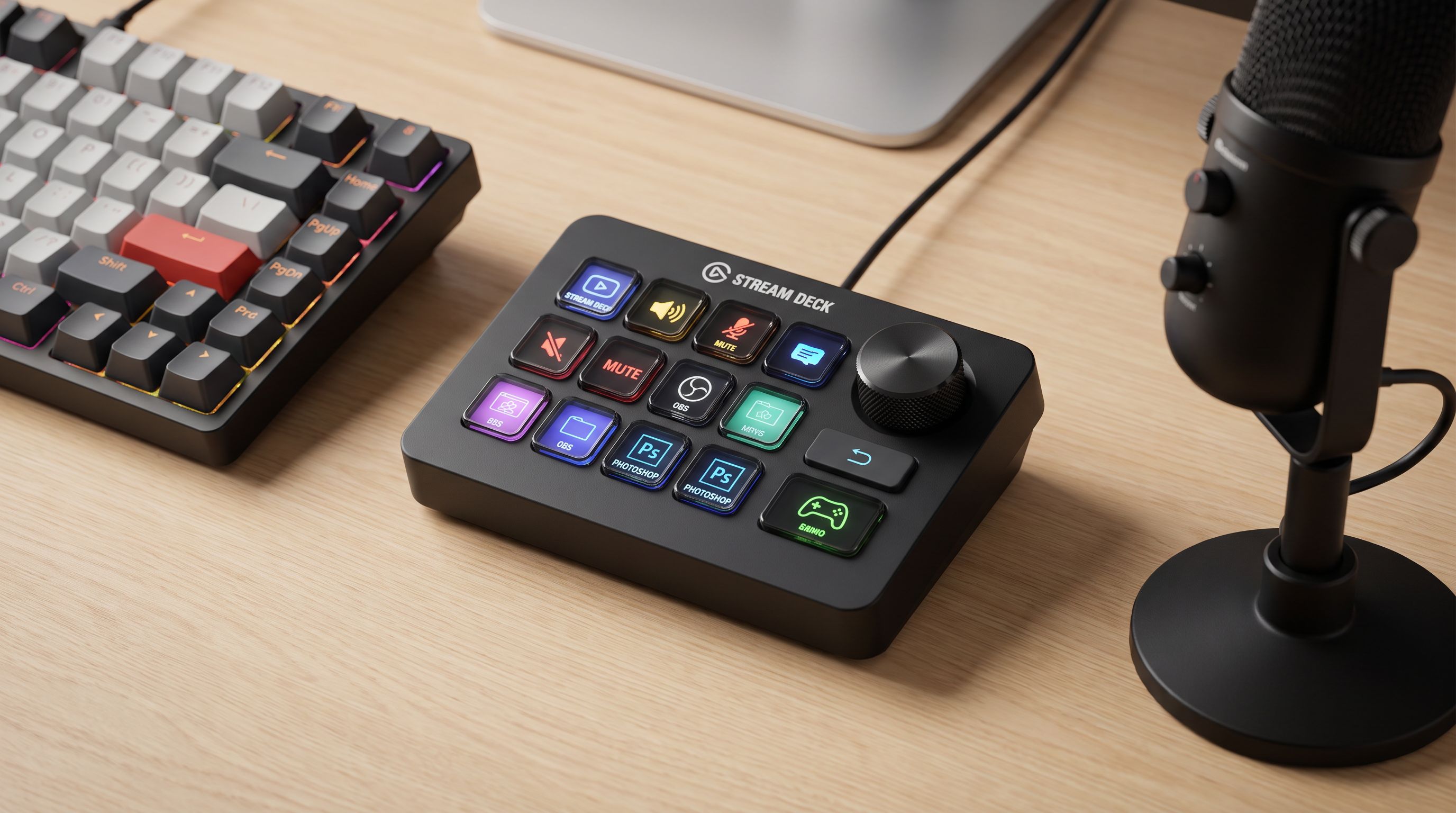
If you stream, edit video, or just juggle twelve apps at once, a programmable control surface is one of the few desk upgrades that genuinely saves time every day. Elgato's Stream Deck defined the category — but it's no longer the only sensible answer, and for a lot of people it isn't the right answer either.
We compared the main Stream Deck alternatives available in 2026 — LCD control decks, mechanical macro pads, and dial-based editing consoles — using manufacturer specs, independent reviews, and verified owner feedback. Here's how to work out which type you actually need, and which models are worth your money.
The three kinds of "Stream Deck alternative"
This is the part most roundups skip, and it's the reason so many people buy the wrong thing.
1. LCD control decks. Every key is a tiny screen, so the icon changes with the profile or folder you're in. This is what Elgato sells, and it's what cheap clones from brands like VSDinside and Mirabox imitate. Pros: legible, context-aware, great for streamers who switch scenes and profiles constantly. Cons: you're dependent on the vendor's software, and that software is where budget clones usually fall apart.
2. Mechanical macro pads. Physical switches, keycaps, usually configured with open firmware like QMK/VIA. No screens, so you either memorize the layout or use labeled keycaps. Pros: rock-solid, tactile, works on Windows, macOS and Linux without proprietary drivers. Cons: no dynamic icons, and macros are keystrokes rather than "actions" — you'll pair it with something like OBS hotkeys, BetterTouchTool or Keyboard Maestro.
3. Dial and touch consoles. Loupedeck-style devices that mix buttons with rotary encoders. Pros: dials are dramatically better than buttons for anything continuous — scrubbing a timeline, exposure sliders, mic gain. Cons: overkill if you only need scene switching.
Pick the category first. The model choice gets easy after that.
What actually matters when you compare them
- Software, not hardware. The keys are cheap; the integration is not. Elgato's plugin marketplace covers OBS, Streamlabs, Twitch, Discord, Philips Hue, Spotify, Zoom, Adobe apps and hundreds more. Clone software typically handles keystrokes, app launching and text expansion well, and native app integrations poorly. Reviews of budget LCD pads consistently praise the hardware and criticize the configurator.
- OS support. Check macOS and Apple Silicon explicitly; check Linux if that's your daily driver. QMK/VIA pads are the safest cross-platform bet — configuration lives on the device, so the OS just sees a keyboard. Community projects like ESP32-based DIY decks (the EezBotFun-style boards floating around maker forums) exist mainly because Linux support from big brands is thin.
- Key count. Six keys is enough for a single-app workflow. Fifteen is the sweet spot for streaming. Anything more and you'll likely use folders anyway.
- Connection. USB-C wired is the default and the right choice for a desk device. Wireless is a nice-to-have on mechanical pads; on a streaming deck it's mostly a battery you have to think about.
- Resale and longevity. Elgato hardware holds value and keeps getting software updates. That matters more than a one-time price gap if you sell your gear on.
The picks
Elgato Stream Deck MK.2 — the benchmark you're comparing against
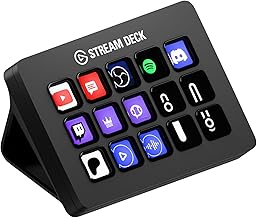 Best overall (the benchmark) · Elgato Stream Deck MK.2 — Check price on Amazon →
We'd be doing you a disservice by pretending the incumbent lost. The Stream Deck MK.2 has 15 LCD keys, swappable faceplates, an adjustable stand, and the most mature ecosystem in the category by a wide margin. Multi-actions, delays, conditional profiles that switch automatically based on the active app — the software does things clones simply don't. If your income depends on your stream or your edit bay, the premium buys you reliability and integrations, not just a badge.
Buy it if: you want it to work on day one with OBS, Discord and your DAW, and you don't want to troubleshoot.
Elgato Stream Deck Mini — the honest budget answer
 Best small Stream Deck · Elgato Stream Deck Mini — Check price on Amazon →
Here's the uncomfortable truth about the "skip the $150 tax" framing: the cheapest way to get Elgato's software is the Stream Deck Mini. Six LCD keys, identical app, full plugin access. Six keys with folders covers scene switching, mute, start/stop recording and a clip marker — which is genuinely what most part-time streamers use.
Buy it if: you want real Stream Deck functionality on a small desk and a smaller budget, and you're fine with folders.
Keychron Q0 Max — mechanical, open-source, no vendor lock-in
 Best mechanical macro pad · Keychron Q0 Max — Check price on Amazon →
The Keychron Q0 Max is a gasket-mounted, hot-swappable numpad-style macro pad with a rotary knob, QMK/VIA support and wireless connectivity. Because configuration is stored in firmware, it behaves identically on Windows, macOS and Linux with zero drivers. Map it to OBS hotkeys, Premiere shortcuts, or a Blender toolset; swap in tactile switches and relegendable keycaps and you've got a control surface that will outlive several generations of streaming software.
Buy it if: you're on Linux, you hate proprietary configurators, or you just want something that feels like a keyboard rather than a remote control.
Loupedeck Live S — for people who edit more than they stream
 Best for video and photo editors · Loupedeck Live S — Check price on Amazon →
Buttons are binary. Editing is not. The Loupedeck Live S combines customizable touch buttons with rotary dials, which is transformative for timeline scrubbing, exposure and colour adjustments, and audio levels in Premiere Pro, DaVinci Resolve, Lightroom and Photoshop. It also handles OBS and Discord, so it doubles as a stream controller — just one built around a different primary job.
Buy it if: your day is spent in a timeline or a develop module, and you want to stop dragging sliders with a mouse.
Razer Stream Controller X — a credible mainstream challenger
 Best budget control deck · Razer Stream Controller X — Check price on Amazon →
The Razer Stream Controller X brings 15 customizable keys with plugin support for OBS, Twitch, Discord and Spotify, configured through Razer Synapse. It's the most legitimate non-Elgato LCD deck from a brand that will still be supporting drivers in three years — which is more than can be said for many no-name clones.
Buy it if: you want Stream Deck-style function at a lower cost without gambling on unsupported software.
Comparison table
| Model | Type | Controls | Best for | Software | Cross-platform |
|---|---|---|---|---|---|
| Elgato Stream Deck MK.2 | LCD control deck | 15 LCD keys | Serious streamers, all-round use | Stream Deck (largest plugin library) | Windows, macOS |
| Elgato Stream Deck Mini | LCD control deck | 6 LCD keys | Small desks, budget entry to Elgato's ecosystem | Stream Deck | Windows, macOS |
| Keychron Q0 Max | Mechanical macro pad | Hot-swap keys + knob | Linux users, tinkerers, no-driver setups | QMK / VIA (on-device) | Windows, macOS, Linux |
| Loupedeck Live S | Touch + dial console | Touch buttons + rotary dials | Video/photo editors, audio control | Loupedeck | Windows, macOS |
| Razer Stream Controller X | LCD control deck | 15 customizable keys | Budget-conscious streamers wanting supported software | Razer Synapse | Windows (check macOS support) |
What about the ultra-cheap clones?
You'll see 15-key LCD pads from VSDinside, Mirabox and similar sellers at a fraction of Elgato's price, and the hardware is often surprisingly decent — bright screens, solid stands, USB-C. Owner feedback points at the same recurring issues: clunky configurator software, occasional English-translation weirdness, limited native app integration (so you're mapping keystrokes rather than triggering real OBS actions), and uncertainty about long-term updates.
That's not a dealbreaker if your needs are simple — launching apps, running keystroke macros, pasting boilerplate text. It is a dealbreaker if you want a key that shows your live viewer count or mutes a specific Discord user. Budget clones are best treated as programmable launchers with pretty screens, not Stream Deck replacements.
One more option worth knowing: if you only need a handful of actions, Elgato's Stream Deck Mobile app turns a phone or tablet into a soft deck via subscription, and free tools like Touch Portal or Deckboard do something similar on Android. Try that before spending anything — you'll learn exactly how many keys you really use.
FAQ
Is a macro pad as good as a Stream Deck? For keystroke macros, app launching and shortcuts, yes — and often better built. For deep integrations with OBS, Twitch, Discord and Adobe apps, no. The gap is software, not hardware.
Do these work on Mac? Elgato, Loupedeck and Keychron all support macOS. Some budget LCD decks and Razer Synapse have patchier Mac support, so verify before buying. QMK/VIA pads like the Keychron Q0 Max are the safest bet because configuration is stored on the device.
What's the best option for Linux? A QMK/VIA mechanical macro pad. Elgato hardware can be driven on Linux with community projects like streamdeck-ui, but it's unofficial. DIY ESP32-based decks are popular in the Linux community for the same reason.
How many keys do I actually need? Track your workflow for a week. Most streamers land on 6–10 genuinely frequent actions; 15 keys plus folders covers almost everyone. Buy more only if you dislike folder navigation.
Are dials worth it? If you edit video, photos or audio, yes — a rotary encoder beats a button for anything with a range. If you only switch scenes and mute a mic, skip them and save the money.
Our picks
Elgato Stream Deck MK.2 Studio Controller, 15 Macro Keys
15 LCD keys and the deepest plugin ecosystem — the pad every alternative is measured against.
Elgato Stream Deck Mini, 6 Customizable LCD Macro Keys
Six LCD keys, same software and plugins, a fraction of the desk space.
Keychron K0 Max Wireless Low-Profile Number Pad, QMK/VIA Programmable, Hot-Swappable Brown Switch, RGB Backlit, 2.4GHz & Bluetooth 5.3, 1000Hz Polling Rate, with Knob, for Windows/Mac
Hot-swap numpad-style macro pad with QMK/VIA remapping and a knob — no vendor software required.
Loupedeck Live – The Custom Console for Live Streaming, Photo and Video Editing with Customizable Buttons, Dials and LED Touchscreen
Touch buttons plus dials for scrubbing, exposure and audio — built for timeline work, not just scene switching.
Razer Stream Controller: All-In-One Keypad for Streaming - 12 Haptic Switchblade Keys - 6 Tactile Analog Dials - 8 Programmable Buttons - Designed for PC & Mac Compatibility
15 customizable switchblade-style keys with plugin support for OBS, Discord and Spotify.
Get the best tech deals in your inbox
Join the BytePlaza newsletter for hand-picked gadget deals and new buying guides. No spam, unsubscribe anytime.
Related reads

Wearable AI Recorders in 2026: 4 Picks That Actually Stick
Looking for the best AI voice recorder wearable in 2026? We compare Plaud, Anker Soundcore Work and Limitless on accuracy, battery, subscriptions and consent.
34" vs 49" Ultrawide Monitors: Which One Fits Your Desk in 2026?
The best ultrawide monitor for 2026 depends on desk depth, not just specs. We compare 34-inch and 49-inch OLED and IPS picks for work-from-home productivity.
Retro Handhelds Over $200 in 2026: PS2-Class Picks
Outgrown your $60 retro handheld? Here are the best retro handheld consoles over $200 in 2026 — GameCube and PS2-capable chips, better screens, real ergonomics.