Phone Cooling Fans in 2026: 4 Picks That Hold Frame Rates
We compared clip-on and magnetic phone coolers on peak wattage, MagSafe fit, noise and owner-reported frame-rate stability. Here are the best phone cooling fans for 2026.
Reader-supported: we may earn a commission from links on this page, at no extra cost to you. It never affects our picks. Learn more.
Mobile games have outgrown mobile thermals. A flagship phone can hold peak clocks for maybe 10–20 minutes of a demanding title before the SoC starts shedding frequency to protect itself — and once that happens, your smooth 120fps turns into a stuttery 60-to-80fps mess right when a raid or ranked match matters. A phone cooling fan is the cheapest way to push that throttle point back.
But the category is full of noise. Listings shout "50W!" and "-30°C!" with no standard behind either number. We compared the current crop of clip-on and magnetic coolers on the things that actually correlate with sustained frame rates: cooling method, mounting security, fan noise, power requirements, and what long-session owners report after weeks of use.
How phone coolers actually work
Almost every cooler worth buying uses a Peltier (thermoelectric) module — a semiconductor plate that gets cold on one side and hot on the other, with a fan dumping the hot side's heat into the room. Cheap fan-only coolers exist and they do very little beyond moving air across a case you should have removed anyway.
Two things follow from that:
- Peltier coolers need real power. They draw from a USB-C cable, not a battery in the phone. If you unplug it, cooling stops. Plan on running a cable to a wall charger or power bank.
- Condensation is real. A very cold plate against a warm phone in a humid room produces moisture. Most good coolers ship with modes that limit plate temperature for this reason, and it's a genuine argument against always running "max" indoors in summer.
Wattage claims deserve skepticism
There is no industry test standard for phone cooler wattage. A "50W" cooler is usually quoting peak electrical draw of the Peltier module under ideal conditions, not cooling capacity delivered to your phone. Real-world temperature drop depends far more on contact area, cold-plate flatness, and how well the heatsink and fan clear the hot side than on a headline number. Treat wattage as a rough tier indicator — 6–12W entry, 20–30W mainstream, 40W+ enthusiast — not a spec you can compare across brands.
Clip-on vs magnetic: the real decision
This is the choice that determines whether you'll actually use the thing.
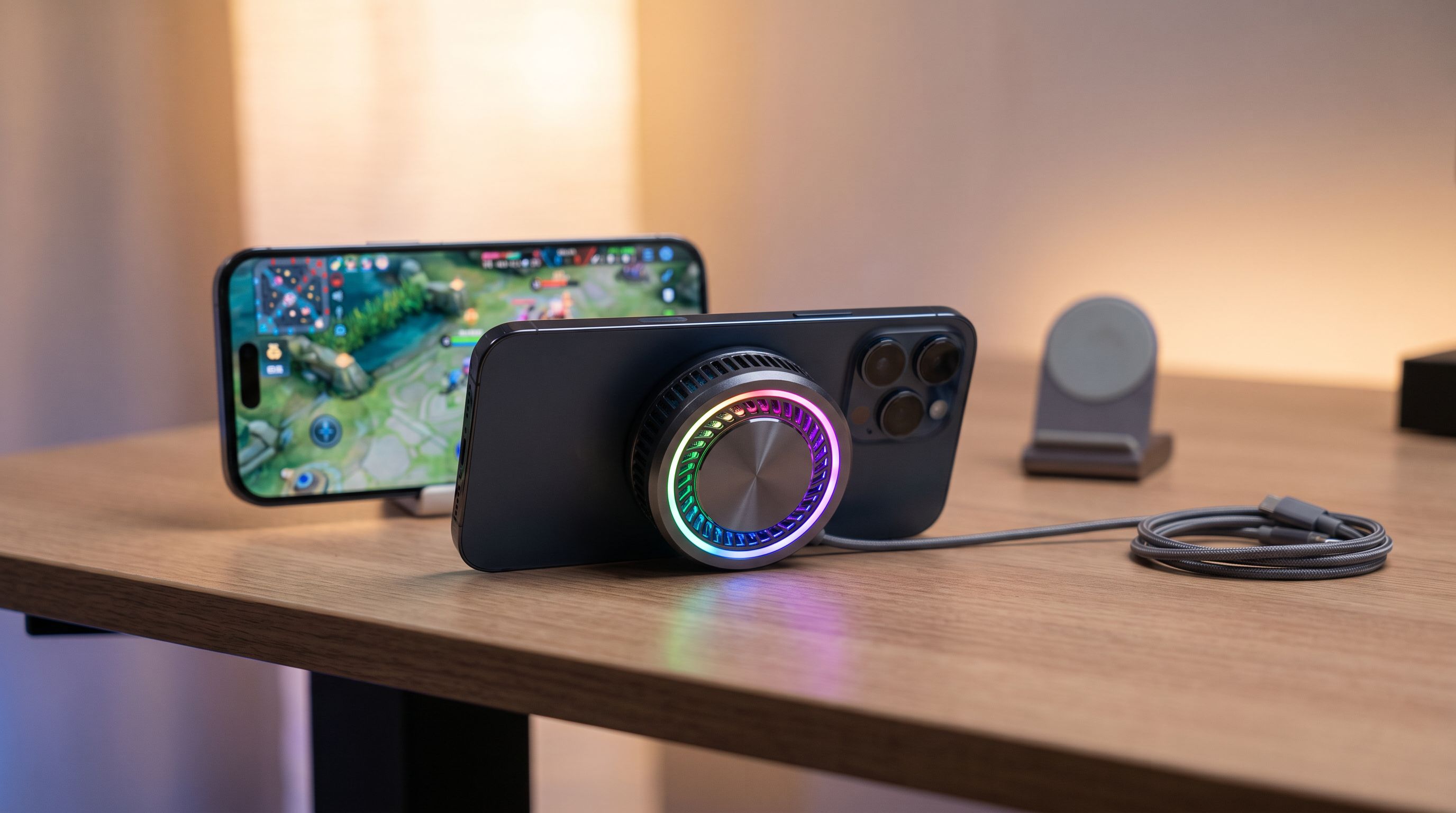
Magnetic coolers snap onto MagSafe iPhones or Android phones with a magnetic ring (or a stick-on ring plate). They're fast to attach, centered over the SoC on most phones, and don't block the screen edges. The catch: magnet strength varies wildly, and a thick case pushes the cooler further from the phone's back, which measurably reduces heat transfer. Some units also interfere with wireless charging while attached — you can't do both at once.
Clip-on coolers clamp to the top or middle of the phone with spring-loaded arms. They grip almost any phone including cased ones and non-magnetic Androids, and contact pressure tends to be better. The downsides are bulk, occasional edge-of-screen intrusion in landscape, and the risk of scratching a glass back if the pads are worn.
Our short version: if you have a recent iPhone or a MagSafe-compatible Android and you game caseless or in a thin case, go magnetic. If you use a thick or rugged case, own a tablet, or want the firmest possible contact, go clip-on.
The picks
Black Shark MagCooler 4 Pro — best overall
 Best overall · Black Shark MagCooler 4 Pro — Check price on Amazon →
Black Shark has been building phone coolers longer than almost anyone, and the MagCooler 4 Pro is the safest recommendation in 2026. It's a magnetic semiconductor cooler with a substantial heatsink and app control over cooling modes and lighting. Owner feedback consistently points to the same thing that matters: it keeps a flagship out of aggressive throttling for genuinely long sessions rather than just producing a dramatic thermometer reading in the first two minutes.
It's not silent — nothing in this power class is — and it needs a cable. But the magnet holds through landscape play, and the app lets you dial cooling back if condensation is a concern.
Razer Phone Cooler Chroma — best clip-on
The Razer Phone Cooler Chroma remains the most polished clip-on. The clamp accommodates cased phones, the Peltier plus seven-blade fan combo runs noticeably quieter than most generic clamps, and Chroma sync is a nice touch if you already live in Razer's ecosystem. Reviewers repeatedly flag it as one of the few coolers you can use without a headset because of the noise floor.
Trade-offs: it needs Razer's software for full control, and the clamp adds visible bulk to the top of the phone. If your grip style puts fingers near the top edge, try it before committing.
Black Shark FunCooler 3 Pro — best for heavy throttling
 Best for heavy throttling · Black Shark FunCooler 3 Pro — Check price on Amazon →
If you're running emulators, extended 120Hz sessions, or a phone that's already known for running hot, the FunCooler 3 Pro sits at the higher-wattage end of the clamp category. The larger cold plate and heatsink give it more sustained headroom than slimmer magnetic units, and the clamp keeps contact pressure consistent as the phone warms and expands slightly.
Expect more fan noise and more bulk. This is the "I want the frame rate, I'll live with the whine" option.
Ulanzi CA25 Magnetic Phone Cooler — best for creators
Gaming isn't the only thing that cooks a phone. Long 4K60 or 4K120 recording will hit thermal limits faster than most games. The Ulanzi CA25 is a magnetic cooler designed with that use case in mind — it mounts cleanly alongside rigs and gimbals, runs relatively quietly, and works just as well for a two-hour gaming stint. If you shoot video and game, it's the more versatile buy.
Comparison table
| Model | Mount | Cooling type | Best for | Main trade-off |
|---|---|---|---|---|
| Black Shark MagCooler 4 Pro | Magnetic (MagSafe-style) | Semiconductor + fan | All-round long-session gaming | Needs cable; moderate fan noise |
| Razer Phone Cooler Chroma | Clip-on clamp | Semiconductor + fan | Cased phones, quieter operation | Bulk at top edge; app-dependent |
| Black Shark FunCooler 3 Pro | Clip-on clamp | High-output semiconductor | Worst-case throttling, emulation | Loudest, bulkiest of the group |
| Ulanzi CA25 | Magnetic | Semiconductor + fan | Gaming plus long video recording | Magnetic hold weakens with thick cases |
How to get the most out of a cooler
- Take the case off, or use a thin one. This single change often matters more than upgrading coolers.
- Attach before you start, not after you're throttling. Preventing heat soak is easier than reversing it.
- Power it properly. Run it from a decent power bank or charger. Underpowering a Peltier cooler quietly halves its effectiveness.
- Don't charge and cool at max simultaneously if you can avoid it — fast charging generates its own heat right where the cooler is trying to work.
- Watch for condensation in humid environments; step down a mode rather than running flat out.
- Cap your frame rate if the game allows it. A locked 90fps that never dips feels better than an unlocked rate that swings.
Who should skip a cooler entirely
If you play casual games, in air conditioning, for under 30 minutes at a time, a cooler is solving a problem you don't have. The same is true if your complaint is battery drain rather than stutter — cooling helps longevity slightly but won't meaningfully extend runtime, and the cable requirement means you're tethered anyway. Coolers earn their keep in long, sustained, graphically heavy sessions, and in hot rooms.
FAQ
Do phone coolers actually improve frame rates? Indirectly, yes. They don't make the chip faster — they delay or reduce thermal throttling, so the phone holds its peak clocks longer. Owner reports and third-party reviews consistently describe steadier frame pacing over 30+ minute sessions rather than a higher peak frame rate.
Will a magnetic cooler work on an Android phone? Only if the phone has built-in magnets (an increasing number of Android flagships now support the Qi2 magnetic standard) or you attach an adhesive magnetic ring. Otherwise choose a clip-on like the Razer Phone Cooler Chroma or Black Shark FunCooler 3 Pro.
Do these run on battery? The effective ones don't — Peltier cooling needs continuous power over USB-C. Battery-powered coolers exist but typically run short and weak. Budget for a power bank if you game away from an outlet.
Is condensation going to damage my phone? It's a real risk in humid conditions at maximum cooling, which is why most quality coolers include lower-intensity modes. Use a moderate mode indoors in summer, and avoid pointing a very cold plate at a very warm phone for extended periods.
Are cheap fan-only coolers worth it? Rarely. Without a Peltier element you're mostly moving room-temperature air across a glass back. If the listing doesn't mention semiconductor or thermoelectric cooling, expect marginal results.
Our picks
Black Shark Magnetic Phone Cooler 5 Pro - 18 Addressable RGB LEDs, Detachable Grip, APP-Controlled Thermostatic Cooling Fan for iPhone MagSafe/Android/iPad -Gaming/Streaming/Photography
Strong semiconductor cooling, magnetic attach and a mature app — the most consistent all-rounder for long sessions.
Razer Phone Cooler Chroma
Clamp design fits thick cases and non-magnetic Androids, with quiet fan-plus-Peltier cooling and Chroma lighting.
Black Shark FunCooler 6 Magnetic Cell Phone Cooler for Gaming, Portable Mobile Phone Cooling Fan with RGB Light, App-Controlled Cellphone Radiator for iPhone Magnetic Series/iPad (Black)
High-wattage semiconductor cooling with a clamp mount — built for hours of emulation and high-refresh shooters.
Ulanzi CA25 Magnetic Phone Cooler
Magnetic cooler aimed at long 4K video recording as well as gaming, with a cold plate and quiet fan.
Get the best tech deals in your inbox
Join the BytePlaza newsletter for hand-picked gadget deals and new buying guides. No spam, unsubscribe anytime.
Related reads
Bedside Charging Stations in 2026: 5 Picks That Kill Cable Clutter
The best bedside charging station for 2026: Qi2 magnetic docks, alarm-clock combos and USB-C hubs compared for speed, dimmable displays and nightstand footprint.
Which Wireless Charger Belongs on Your Desk in 2026?
The best wireless charger for desk setups in 2026: Qi2 25W picks compared on speed, case tolerance, and how many cables they actually remove from your workspace.
Wireless Charging Dock vs Pad in 2026: Which Fits Your Desk?
Wireless charging docks vs pads in 2026: how Qi2, 25W magnetic charging, heat, and desk clutter compare — plus five stands and pads worth buying.