Best Handheld Gaming PC 2026: ROG Ally X vs Steam Deck
We compare the best handheld gaming PCs of 2026 — ROG Ally X, Steam Deck OLED, Legion Go and MSI Claw — on performance-per-watt, screen quality and compatibility.
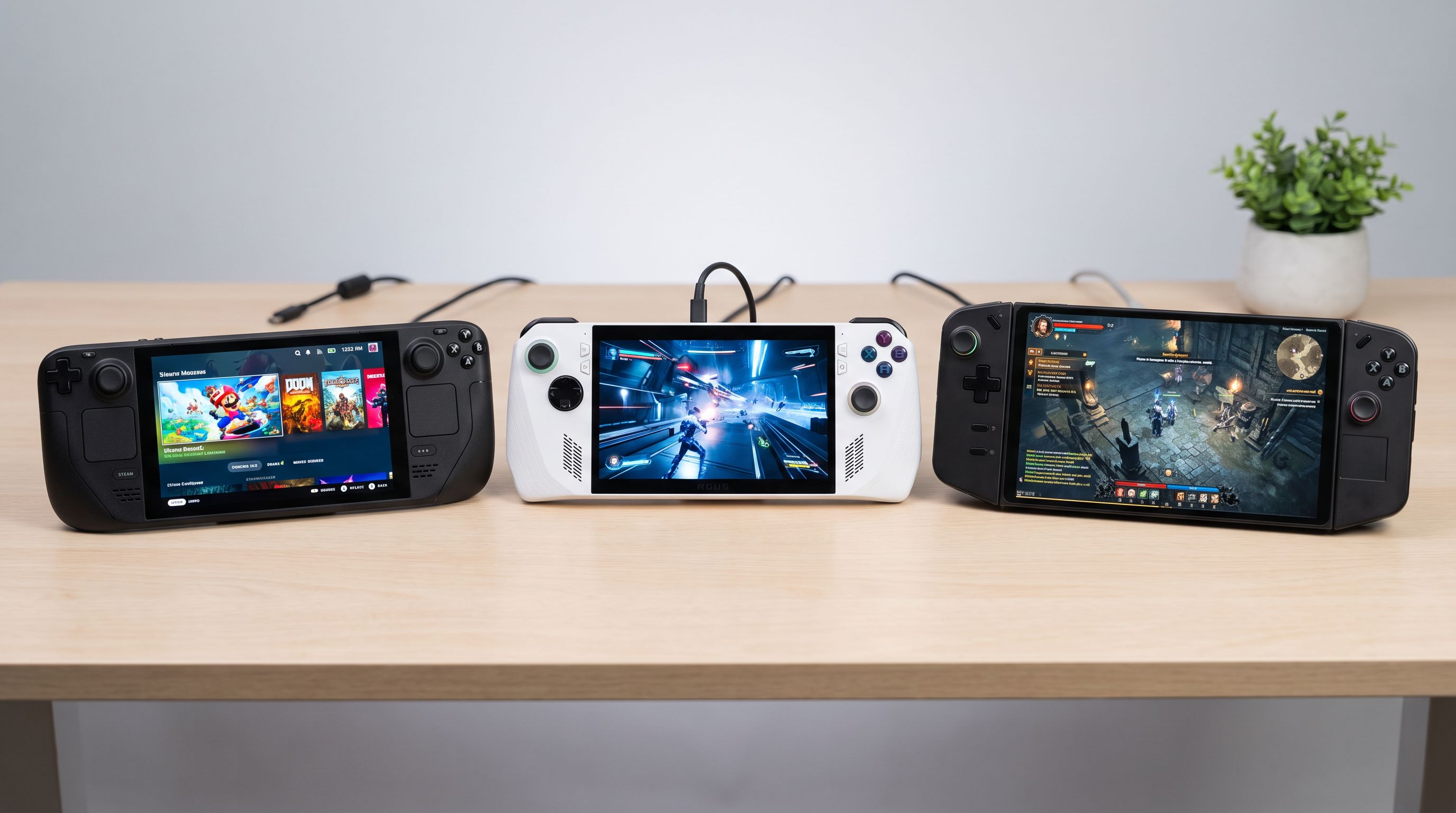
Handheld gaming PCs have stopped being a novelty. Five years after the first Steam Deck shipped, there's a real market with real competition — Valve, ASUS, Lenovo, MSI and a long tail of smaller brands all selling x86 machines that run your existing PC library on the couch, the train or in bed.
The trouble is that spec sheets have become almost useless for choosing between them. Nearly every Windows handheld uses a variant of the same AMD Z-series silicon, and the numbers on the box (TDP, TFLOPs, refresh rate) don't tell you which one will actually feel good in your hands after 90 minutes. So this guide focuses on the three things that genuinely separate these devices: performance-per-watt, screen quality, and game compatibility.
The short answer
If you mostly play games you own on Steam and you want the least friction, the Valve Steam Deck OLED is still the one to buy. It's not the fastest handheld on this list — it isn't close — but SteamOS, the suspend/resume implementation and the power efficiency of its custom APU make it the most pleasant device to actually use.
If you need Windows — for Game Pass, Epic exclusives, anti-cheat-heavy multiplayer titles, VR tethering or serious emulation — the ASUS ROG Ally X is the most complete package, and the MSI Claw 8 AI+ is the efficiency surprise. If you want the biggest, best display, look at the Lenovo Legion Go.
Performance-per-watt is the only performance number that matters
A handheld is a thermal and battery budget problem first and a silicon problem second. Every device here can be dialled from roughly 7–9W up to 25–30W, and the interesting question is how much frame rate you get at the low end, because that's where battery life lives.
Two things have shifted recently:
- Valve's older APU still punches above its weight at low TDP. The Steam Deck's chip is slower in absolute terms, but SteamOS has almost no background overhead and the OLED refresh improved efficiency meaningfully over the LCD model. At 8–10W in a capped 40fps mode, it will often outlast a Windows rival running the same game at the same settings.
- Intel is finally competitive. The MSI Claw 8 AI+ uses Lunar Lake, which was designed around low-power efficiency, and its Arc integrated graphics genuinely close the gap with AMD's Z1 Extreme in many titles — sometimes while drawing less power. Intel's driver situation, historically the weak point, is dramatically better than it was, though older DirectX 9 and 11 games can still behave unpredictably.
The ROG Ally X's advantage is less about raw efficiency and more about brute force: the 80Wh battery is roughly double what the original Ally shipped with, so even at a thirsty 25W you get a usable session. Lenovo's Legion Go is the least efficient of the group, largely because it's pushing a much larger, higher-resolution panel.
Practical takeaway: don't chase the highest TDP. Almost every one of these devices hits its best frames-per-watt somewhere between 12W and 17W. Above that you're paying a lot of battery for a modest frame gain.
Screens: OLED contrast vs size and refresh
This is where the devices diverge most.
The Steam Deck OLED's 7.4-inch HDR panel is the best-looking screen in the category. Perfect blacks, high peak brightness in HDR, and a 90Hz refresh rate that suits the frame rates the hardware actually produces. It's not the sharpest — it's a 1280×800 panel — but at that size, most people won't care.
The ROG Ally X uses a 7-inch 1080p 120Hz IPS panel with variable refresh. It's bright and sharp, and VRR matters a lot on a handheld where frame rates wander. But it's IPS: blacks are grey, and after using an OLED handheld it's hard to unsee.
The Legion Go's 8.8-inch 144Hz display at 2560×1600 is the outlier. It's a lovely screen for emulation, strategy games and general desktop use, and the extra size makes text readable in games that were never designed for handhelds. The catch is obvious: you'll be running most modern titles at 1200p or lower with upscaling, and the whole device is bigger and heavier.
The MSI Claw 8 AI+ splits the difference with an 8-inch 120Hz 1200p panel — arguably the smartest resolution choice on this list, because it's a native step up from 800p without demanding Legion-Go-level GPU work.
Compatibility: SteamOS vs Windows, honestly
SteamOS runs Windows games through Proton, and in 2026 that works remarkably well — the large majority of the Steam catalogue is playable. Where it breaks is predictable: competitive multiplayer games with kernel-level anti-cheat (several major shooters remain blocked), some launcher-dependent titles, and anything requiring specific Windows-only middleware. Valve's Deck Verified badges are genuinely useful, but they only cover Steam.
Windows handhelds run everything, at the cost of running Windows. That means occasional driver hiccups, a desktop OS you'll sometimes have to poke with a touchscreen, and updates that arrive at inconvenient moments. Vendor front-ends — ASUS's Armoury Crate SE, Lenovo Space, MSI Center M — have improved a lot, but none is as invisible as SteamOS.
There's a middle path worth knowing about: SteamOS is no longer Deck-exclusive, and some third-party handhelds now ship with or officially support it. If you want the SteamOS experience on faster hardware, that's an option worth researching before you buy.
Comparison table
| Device | Display | Chip family | Battery | OS | Best for |
|---|---|---|---|---|---|
| Steam Deck OLED 1TB | 7.4" 1280×800 HDR OLED, 90Hz | Custom AMD APU (Van Gogh, 6nm) | 50Wh | SteamOS | Steam-first players, best-in-class UX |
| ROG Ally X 1TB | 7" 1920×1080 IPS, 120Hz VRR | AMD Ryzen Z1 Extreme | 80Wh | Windows 11 | All-round Windows performance, long sessions |
| Legion Go 8.8" 1TB | 8.8" 2560×1600 IPS, 144Hz | AMD Ryzen Z1 Extreme | 49.2Wh | Windows 11 | Big-screen gaming, emulation, detachable pads |
| MSI Claw 8 AI+ A2VM | 8" 1920×1200 IPS, 120Hz VRR | Intel Core Ultra (Lunar Lake) | 80Wh | Windows 11 | Efficiency and battery life on Windows |
Ergonomics, weight and the stuff spec sheets skip
Hold these before you commit if you can. The Steam Deck is the heaviest of the small handhelds but distributes weight the best — wide grips, trackpads that are more useful than they sound (strategy games, inventory menus, older PC titles). The ROG Ally X is lighter and thinner with a shape closer to an Xbox controller; most people find it the most comfortable for long sessions. The Legion Go is heavy, and the detachable controllers are a genuinely clever party trick that most owners use rarely. The Claw 8 AI+ has a chunky, well-balanced chassis with Hall effect sticks, which means no stick drift.
Storage is the other quiet decision. Every device here takes an M.2 2230 SSD and a microSD card, and upgrading later is straightforward on all of them — so buying the mid-tier capacity and adding your own drive is usually the smarter move.
Finally: buy a decent power bank. Handhelds drink watts, and a 100W+ USB-C PD unit like the Anker 737 Power Bank will charge at full speed and keep most of these devices running while you play, which effectively doubles your away-from-home session length.
Who should buy what
- You own a big Steam library and want it to just work: Steam Deck OLED.
- You need Game Pass, Epic, or anti-cheat multiplayer: ROG Ally X.
- You want maximum battery life on Windows and don't mind Intel graphics quirks: MSI Claw 8 AI+.
- You want a big, sharp screen for emulation and slower-paced games: Legion Go.
FAQ
Is the Steam Deck still worth buying in 2026? Yes, if the software experience matters more to you than frame rates. It's the slowest device here, but SteamOS, instant suspend/resume and the OLED panel keep it the most enjoyable to use. If you want to run 2025–2026 AAA releases at high settings, look at the Windows options.
Can handheld gaming PCs run Game Pass? Windows handhelds run the PC Game Pass app natively. On SteamOS you can stream Game Pass via cloud gaming in a browser, but native installs aren't supported without extra work.
What TDP should I actually use? Start around 15W. Most of these chips lose efficiency sharply above the high teens, and dropping from 25W to 15W often costs 15–20% frame rate while adding 40%+ to battery life. Cap your frame rate too — a locked 40fps is smoother than a fluctuating 45–60.
Do these handhelds support external monitors and docks? All of them output video over USB-C and work with standard USB-C docks. The Steam Deck and ROG Ally have first-party docks; a good third-party 100W dock generally does the same job.
Will more powerful handhelds arrive soon? Almost certainly — this category refreshes fast. But the current generation is a genuine plateau in usability, and the main gains from the next wave will be efficiency rather than a transformative leap in playable settings.
Our picks

Valve Steam Deck OLED 1TB Handheld Gaming Console
The best-tuned handheld experience: gorgeous HDR OLED, superb battery life and SteamOS that just works.

ASUS ROG Flow Z13 2.5K 180Hz 3ms ROG Nebula Touchscreen 13.4" Convertible 2-in-1 Gaming Notebook AMD Ryzen AI MAX+ 395 32GB RAM 1TB SSD Off Black
80Wh battery, 24GB RAM and the strongest all-round Windows performance for emulation and non-Steam launchers.

INLAND Micro Center Lenovo Legion Go Upgraded SSD, 8.8 Inch 144Hz WQXGA Gaming Handheld PC, Touchscreen Video Game Console,16GB RAM, AMD Ryzen Z1 Extreme Processor, Shadow Black (1TB)
An 8.8-inch 144Hz 1600p display plus detachable controllers — the most versatile screen in the category.

MSI Claw 8 AI+ A2VM Handheld Gaming PC with Intel Core Ultra 7 Processor 258V, 8-inch 120Hz Touch Display, VRR Support, 80Whr Battery, Thunderbolt 4 for Portable AAA Gaming (32GB RAM + 1TB SSD)
Intel's Lunar Lake chip delivers standout performance-per-watt in an 8-inch 120Hz chassis.

Anker Laptop Power Bank, 25,000mAh Travel Essential with 165W Total Output | 3 USB-C Ports with 100W Max Each, Built-In Retractable Cables, Flight-Ready, for iPhone 17 Series ,MacBook, and More
140W USB-C output tops up any handheld at full speed and can run most of them while you play.
Get the best tech deals in your inbox
Join the BytePlaza newsletter for hand-picked gadget deals and new buying guides. No spam, unsubscribe anytime.